Vista Forums
Vista Forums Home Join Vista Forums Donate Vista Tutorials Tags

Welcome to Vista Forums we are your forum to discuss Windows Vista x64 and x86 systems. Whether you need help or just want to post an idea you have on Vista, this is the forum for you.
Register at Vista forums...the world biggest Windows Vista resource Join Vista Forums Now

Go Back   Vista Forums > Vista Forums > Tutorials

Vista Tutorial Categories Network & Internet Tutorials File & Folder Settings Tutorials Taskbar & Start Menu Tutorials Performance & Maintenance Tutorials General Tips Tutorials Programs & Features Tutorials Context Menu Tutorials Shortcut Tutorials Security & System Tools Tutorials Parental Controls Tutorials User Account Tutorials Hardware & Drivers Tutorials Appearance & Personalization Tutorials Backup & Restore Tutorials Music, Photo, Video and Media Tutorials Power Management Tutorials

About Windows Vista

Update your Vista Drivers Update Your Drivers Now!!
Poll: Did this Tutorial help and work for you?
Poll Options
Did this Tutorial help and work for you?

Comment
 
Tutorial Tools Display Modes
<!-- google_ad_section_start -->About Windows Vista<!-- google_ad_section_end -->
About Windows Vista
How to See the About Windows in Vista
Published by Brink
07-16-2007

How to See About Windows in Vista

Information
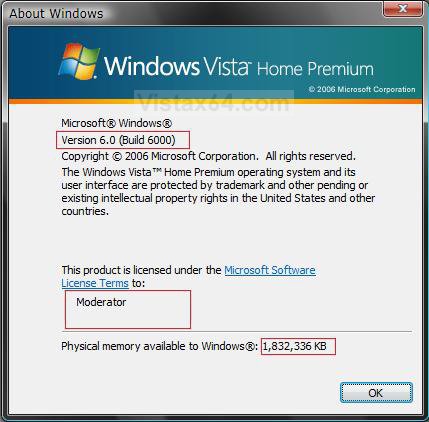
  This will show you the version and build number of Vista, registered owner and organization, and how much RAM is available.
NOTE
  The About Windows exe file is located at: C:\Windows\System32\winver.exe
RELATED LINKS:
EXAMPLE: About Windows
Name:  winver.jpg
Views: 744
Size:  84.8 KB

Here's How:
1. Open a Windows Explorer window.
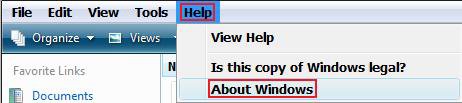
2. Click on Help (on menu bar) and click About Windows. (See screenshot below)

Name:  Windows_Explorer.jpg
Views: 733
Size:  11.8 KB

OR

1. Open the Start Menu.
2. In the white line (Start Search) area, type winver and press Enter.
That's it,
Shawn

Published by
Brink's Avatar
Administrator
Join Date: Apr 2007
Location: Texas, USA
Posts: 16,579
Rep Power: 150
Brink has a reputation beyond reputeBrink has a reputation beyond reputeBrink has a reputation beyond reputeBrink has a reputation beyond reputeBrink has a reputation beyond reputeBrink has a reputation beyond reputeBrink has a reputation beyond reputeBrink has a reputation beyond reputeBrink has a reputation beyond reputeBrink has a reputation beyond reputeBrink has a reputation beyond repute

Tutorial Tools
Show Printable Version Show Printable Version
Email this Page Email this Page

Applies to
All Vista Versions
64 Bit & 32 Bit

Old 07-20-2007  
Grimace
Member


Join Date: Apr 2007
Gold Coast, AUSTRALIA
 
Rep Power: 23
Grimace is a name known to allGrimace is a name known to allGrimace is a name known to allGrimace is a name known to allGrimace is a name known to allGrimace is a name known to all
  Grimace is offline

Re: About Windows Vista

This can also be done by selecting 'run' from your start bar and typing winver

My System SpecsSystem Spec
Old 07-20-2007  
Brink's Avatar
Brink
Administrator


Join Date: Apr 2007
Vista x64 Ultimate SP1
Texas, USA
 
Rep Power: 150
Brink has a reputation beyond reputeBrink has a reputation beyond reputeBrink has a reputation beyond reputeBrink has a reputation beyond reputeBrink has a reputation beyond reputeBrink has a reputation beyond reputeBrink has a reputation beyond reputeBrink has a reputation beyond reputeBrink has a reputation beyond reputeBrink has a reputation beyond reputeBrink has a reputation beyond repute
  Brink is offline

Re: About Windows Vista

Thank you Grimace.
My System SpecsSystem Spec
Old 07-20-2007  
Grimace
Member


Join Date: Apr 2007
Gold Coast, AUSTRALIA
 
Rep Power: 23
Grimace is a name known to allGrimace is a name known to allGrimace is a name known to allGrimace is a name known to allGrimace is a name known to allGrimace is a name known to all
  Grimace is offline

Re: About Windows Vista

Quote:
brink
View Post
Thank you Grimace.
No worries just thought id add that bit for the people using the classic start menu
My System SpecsSystem Spec
Old 07-20-2007  
Brink's Avatar
Brink
Administrator


Join Date: Apr 2007
Vista x64 Ultimate SP1
Texas, USA
 
Rep Power: 150
Brink has a reputation beyond reputeBrink has a reputation beyond reputeBrink has a reputation beyond reputeBrink has a reputation beyond reputeBrink has a reputation beyond reputeBrink has a reputation beyond reputeBrink has a reputation beyond reputeBrink has a reputation beyond reputeBrink has a reputation beyond reputeBrink has a reputation beyond reputeBrink has a reputation beyond repute
  Brink is offline

Re: About Windows Vista

Grimace,

Please, feel free to add whatever you like.

Shawn
My System SpecsSystem Spec
Old 07-21-2007  
TeMerc's Avatar
TeMerc
Newbie


Join Date: Jul 2007
Windows XP\Vista Ultimate
 
Rep Power: 12
TeMerc will become famous soon enoughTeMerc will become famous soon enough
  TeMerc is offline

Re: About Windows Vista

I found a system gathering utility which gives you a bit more details in regards to your build number, at least I think it does.

It's called System Info for Windows:
SIW | System Information for Windows
My 'build lab' info is:
Build Lab 6000.vista_rtm.061101-2205

I'm not sure what if any difference there are or will be with any other systems.

I found that not too many other system gathering tools provide this detailed info, about the build anyways.
My System SpecsSystem Spec
Old 07-21-2007  
Brink's Avatar
Brink
Administrator


Join Date: Apr 2007
Vista x64 Ultimate SP1
Texas, USA
 
Rep Power: 150
Brink has a reputation beyond reputeBrink has a reputation beyond reputeBrink has a reputation beyond reputeBrink has a reputation beyond reputeBrink has a reputation beyond reputeBrink has a reputation beyond reputeBrink has a reputation beyond reputeBrink has a reputation beyond reputeBrink has a reputation beyond reputeBrink has a reputation beyond reputeBrink has a reputation beyond repute
  Brink is offline

Re: About Windows Vista

Thank you TeMerc.
My System SpecsSystem Spec
Comment

Tags
general tips, windows

Tutorial Tools
Display Modes


Update your Vista Drivers Update Your Drivers Now!!

Similar Threads
Tutorial Tutorial Starter Category Comments Last Post
vista windows & windows email & windows security Linda Vista mail 3 05-20-2008 06:39 PM
How to upgrade windows vista business to windows vista enterprise? Shelendra Kumar Vista General 6 03-19-2008 01:52 AM
Upgraded Vista always tries to boot to Windows XP Setup - Have tomanually select Windows Vista evilspoons Vista General 1 01-02-2008 06:58 PM
Bug - in Windows Mail (Windows Vista) and Outlook Express (Windows ashwin Vista mail 0 04-15-2007 05:52 PM
Import Eduora 6.xx into windows Vista Mail or windows vista Outlook Jim Burmeister Vista mail 0 02-25-2007 01:28 PM


Vistax64.com is an independent web site and has not been authorized,
sponsored, or otherwise approved by Microsoft Corporation.
"Windows Vista", the Start Orb, and related materials are trademarks of Microsoft Corp.
© Designer Media 2005-2008
Tutorial powered by GARS 2.1.8m ©2005-2006