
How to Change a Folder Icon in Vista and Windows 7
 Information
This will show you how to change a folder icon to any icon you would like.
 Note
NoteYou will not be able to change a protected system folder icon. For example: C:\Windows, C:\Program Files, C\Windows\System32, etc...
 Tip
Tip- To fix the User Folders instead, see: How to Fix a Personal User Shell Folder Displayed as a Standard Yellow Folder Icon in Vista
- To change all of the default yellow folder icons, you can change the Folder key's default icon full path to one you want instead using step 6 on in this tutorial.
 Warning
If you change the folder icon, the folder will no longer show a thumbnail preview of it's content. It will show your icon instead.
EXAMPLE: Before and After Icon Change


Here's How:
1. Right click on the folder and click on Properties.
2. Click on the Customize tab. (see screenshot below)
3. To Change the Folder Icon
A) Click on the Change Icon button.
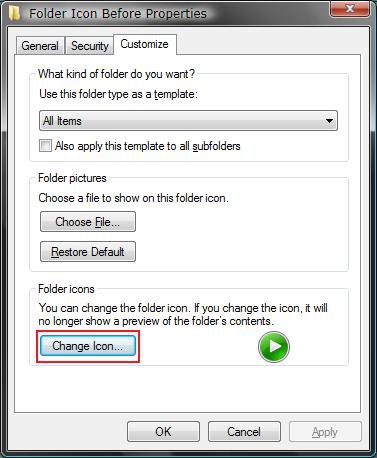
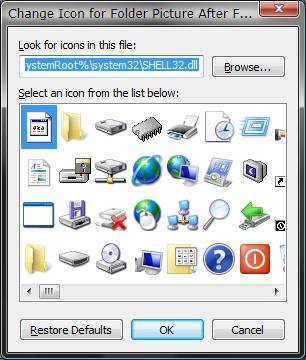
B) Select a icon and click on OK to apply. (see screenshot below)
NOTE: Some common icon locations in both Vista and Windows 7.
- C:\Windows\System32\imageres.dll (Recommended one to use)
- C:\Windows\System32\shell32.dll
- C:\Program Files\Internet Explorer\iexplore.exe
OR
C) Click on Browse to choose a icon of your own. (see screenshot above)
NOTE: For the best icon size results, use a 256x256 pixel .ico (Icon) file.
D) Navigate to where you have the icon saved. (see screenshot below)
E) Select the icon and click on Open.
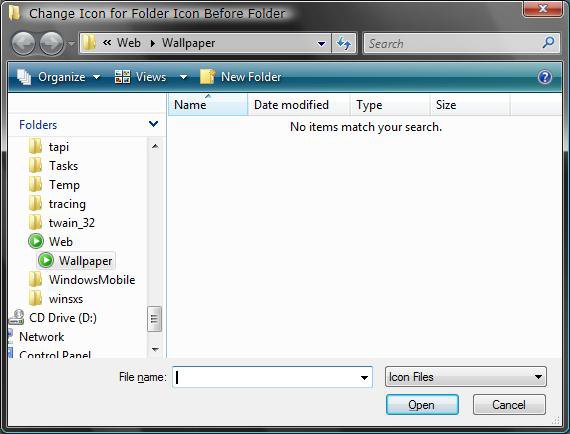
F) Click on OK to apply. (see screenshot from step 4 above)
4. To Restore the Default Folder Icon
A) Click on the Restore Defaults button. (see screenshot below step 3A)
That's it,
Shawn
Related Tutorials
- How to Change a Folder Preview Picture in Vista
- How to Change a Shortcut Folder or File Icon in Vista
- How to Change the Open Folder Icon in Vista
- How to Change a Icon in the Control Panel in Vista
- How to Fix a Personal User Shell Folder Displayed as a Standard Yellow Folder Icon in Vista
- How to Change a Drive Icon in Vista
- How to Restore and Change a Desktop Icon in Vista
- How to Change the Desktop Control Panel Icon in Vista
- How to Rebuild the Icon Cache in Vista
- How to See the Folder Size in Vista
- How to Hide a Folder or Shortcut Icon in Vista and Windows 7
- How to Change a File Extension Type Icon in Vista
- How to Change the Vista Default Folder Icon
- How to Change the Windows 7 Default Folder Icon
- How to Change Windows 7 Default Folder Icons using Resource Hacker
Last edited by a moderator:


