Windows Vista Forums
Vista Forums Home Join Vista Forums Windows 7 Forum Vista Tutorials Tags
Welcome to Windows Vista Forums. Our forum is dedicated to helping you find solutions with any problems, errors or issues you are experiencing with Windows Vista. The Vista forum also covers news and updates and has an extensive Windows Vista tutorial section that covers a wide range of tips and tricks.

Go Back   Vista Forums > Vista Forums > Tutorials

Vista Tutorial - Folder Preview Picture Change

Comment
 
Old 08-28-2007  
Brink
Administrator


Join Date: Apr 2007
Vista x64 Ultimate SP2, Windows 7 Ultimate x64


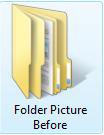
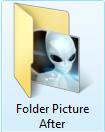
Folder Preview Picture Change

How to Change a Folder Preview Picture in Vista
...

My System SpecsSystem Spec
Old 10-15-2007  
Brink
Administrator


Join Date: Apr 2007
Vista x64 Ultimate SP2, Windows 7 Ultimate x64


Re: Folder Preview Picture Change

Dr. Zaius,

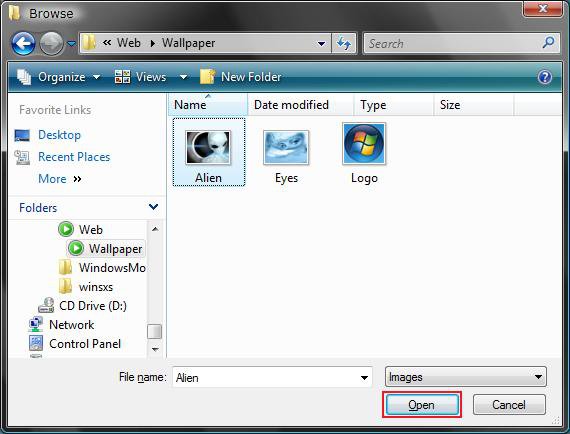
I created a folder with subfolders in it that had some PNG files in both in the same location as yours. I used a JPEG from the C:\Windows\Web\Wallpaper location for the preview picture for both the main folder and subfolders. I had to hit F5 on one of them to refresh the window, but they all changed to the preview picture. I updated the tutorial with these new findings. I hope it helps.

Nice workaround you found though.

Shawn

My System SpecsSystem Spec
Old 10-17-2007  
Borna_mir
Member


Join Date: Oct 2007
Vista home premium


Re: Folder Preview Picture Change

Hi, Here's the address of that "ordinary folder":

C:>Cool>Famous People>Sad But True Pictures>Our Country

This folder only contains pictures.

Borna
My System SpecsSystem Spec
Old 10-17-2007  
Brink
Administrator


Join Date: Apr 2007
Vista x64 Ultimate SP2, Windows 7 Ultimate x64


Re: Folder Preview Picture Change

Borna,

I created the exact same folders with the same names and location as yours. I even threw in some pictures in the folder. It allowed me to change the display picture without any problems for all the folders. Strange and frustrating that you cannot. You might try temporarily relocating these folders into the C:\Users\(your username)\Pictures folder to see if they willl change there; or/so you can recreate new folders in the original location to see if that will help and transfer the pictures back over when done.

Shawn
My System SpecsSystem Spec
Old 10-18-2007  
Dr.Zaius
Newbie


Join Date: Oct 2007
Vista


Thumbs up Re: Folder Preview Picture Change

Refreshing in and of itself didn't help, but it did give me an idea that turned out to work.


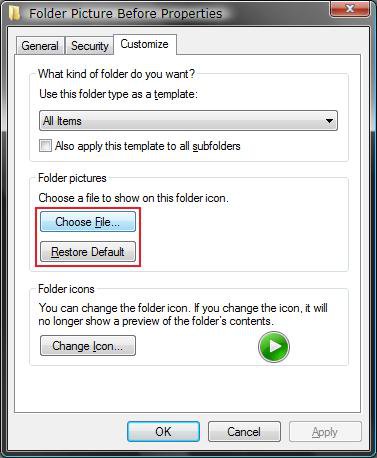
Going to properties/customize/change icon, clicking "restore defaults" then selecting the desired preview file as normal did the job. Inexplicably still have to restore the default icon again each time I want to change the preview image, but no biggie. Thanks for all your efforts Brink, and hopefully this will also work for you, Borna.

Last edited by Dr.Zaius; 10-18-2007 at 11:24 PM..
My System SpecsSystem Spec
Old 10-19-2007  
Brink
Administrator


Join Date: Apr 2007
Vista x64 Ultimate SP2, Windows 7 Ultimate x64


Re: Folder Preview Picture Change

Dr. Zaius,

Glad you found a solution for your problem. Thank you for the feedback.

Shawn
My System SpecsSystem Spec
Old 10-23-2007  
Brink
Administrator


Join Date: Apr 2007
Vista x64 Ultimate SP2, Windows 7 Ultimate x64


Re: Folder Preview Picture Change

Updated to add step 7 for problems with changing preview picture.
10-23-07

Shawn
My System SpecsSystem Spec
Old 10-31-2007  
Bitshifter
Newbie


Join Date: Oct 2007
Vista Ultimate


Re: Folder Preview Picture Change

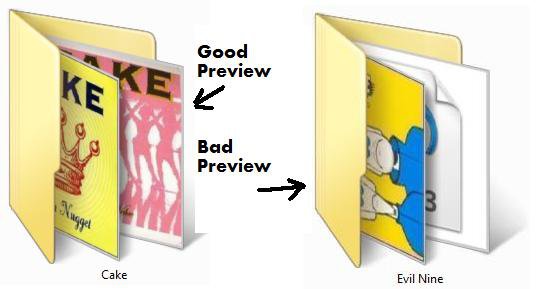
I have a more elaborated question about the folder preview display:
Is it possible to have the preview show more than one picture by user definition?
I'll explain: some of my folders (mostly music folders containing albumarts) have multiple folders within them + songle MP3's not in folder.
Example: The folder: H:/Avril Lavinge will have 3 Folders within it (Say H:/Avril Lavinge/Under My SKin, H:/Avril Lavinge/My World and H:/Avril Lavinge/Let Go, along with these folders there are 3 more files, MP3, named 1.mp3, 2.mp3 and 3.mp3)
The subfolders are set the way I like it, with thumbnail preview all good. My question sums to this: Whenever viewing the master folder (i.e. h:/Avril Lavgine) the preview will show one of the sub-folder's preview (which is good), but in addition it will add MP3 icon previews as well.
Can I change the preview so it will show only the subfolders' albumart/thumbnails?
Thanks!

good-preview.jpg
My System SpecsSystem Spec
Old 10-31-2007  
Brink
Administrator


Join Date: Apr 2007
Vista x64 Ultimate SP2, Windows 7 Ultimate x64


Re: Folder Preview Picture Change

Hi Bitshifter,

Welcome to the forum.

Only if you put the MP3's in an additional subfolder in that folder.

Sorry,
Shawn
My System SpecsSystem Spec
Old 10-31-2007  
Bitshifter
Newbie


Join Date: Oct 2007
Vista Ultimate


Re: Folder Preview Picture Change

Thanks. That is what I thought. Oh well.
My System SpecsSystem Spec
Old 02-13-2008  
Renegade466
Newbie


Join Date: Feb 2008
Vista Home Premium 32bit


Re: Folder Preview Picture Change

Hi, I've had a similar problem for a while now and didnt know where to turn

So I have alot of folders on my external hard Drive K: , mainly Music, videos etc. I want to change the preview picture to the album art jpeg/png in the folder. It just looks like this by default Name:  Folder.jpg
Views: 231
Size:  2.9 KB So
I try the 'Properties/Customize/Choose File' method but it doesnt seem to work. Even when I do Restore Default first.

The wierd thing is though, I tried the same thing with some folders in my internal drive C: and it works :/

So it seems only my external drive wont allow me to change the folder previews, any idea what I can do??
My System SpecsSystem Spec
Comment

Tutorial Tools


Similar Threads
Tutorial Category
Picture Preview? General Discussion
How to change folder icon that can preview images in the folder? Vista General
Change Picture folder read only attribute Vista General
Change Picture Folder Problem Vista file management
Picture icons don't show preview of picture Vista music pictures video


Vista Forums is an independent web site and has not been authorized,
sponsored, or otherwise approved by Microsoft Corporation.
"Windows Vista", the Start Orb, and related materials are trademarks of Microsoft Corp.
© Designer Media Ltd
Tutorial powered by GARS 2.1.8m ©2005-2006

1 2 3 4 5 6 7 8 9 10 11 12 13 14 15 16 17 18 19 20 21 22 23 24 25 26 27 28 29 30 31 32 33 34 35 36 37 38 39 40 41 42 43 44 45 46