![]() |
![]() | ![]() | ![]() | ![]() | ![]() | ![]() | ![]() |
| Welcome to Windows Vista Forums. Our forum is dedicated to helping you find solutions with any problems, errors or issues you are experiencing with Windows Vista. The Vista forum also covers news and updates and has an extensive Windows Vista tutorial section that covers a wide range of tips and tricks. |
| |||||||
![]() |
| |
| | |
| Vista x64 Ultimate SP2, Windows 7 Ultimate x64 | Folder Preview Picture Change How to Change a Folder Preview Picture in Vista |
My System Specs![]() |
| | |
| Vista Ultimate | Re: Folder Preview Picture Change Do you have folder.jpg files (usually hidden) in those folders (on the external hard drive that is)? Sometimes enabling views of hidden files and Operating system files, then deleting the desktop.ini and thumbs.db along with the other jpg files, and then reinserting the folder.jpg (and albumArtXXXXX_large/small.jpg if exist) does the trick. It takes a 1-2 refresh before it actually appears in the explorer preview. Hope it helps |
My System Specs![]() |
| | |
| Vista x64 Ultimate SP2, Windows 7 Ultimate x64 | Re: Folder Preview Picture Change Hi Renegade466, This would be normal for any external device. External devices do not retain their Windows Explorer folder view settings in Vista. If it did, it would cause problems if computer A changed something that computer B thought was still there when trying to open it. The only way around it is to put them on a internal drive. You should be able to change them then. Sorry, ![]() Shawn |
My System Specs![]() |
| | |
| Vista Home Premium 32bit | Re: Folder Preview Picture Change Ah man thats what I feared, oh well I guess I'll just copy the files to the internal but keep the ones on the external for backup. The file preview thing is not a biggie but I'm picky when it comes to those sorta things I like organisation. Oh well. Thanks for your time and helps anyway guys. |
My System Specs![]() |
| | |
| Vista x64 Ultimate SP2, Windows 7 Ultimate x64 | Re: Folder Preview Picture Change You're welcome Renegade466. |
My System Specs![]() |
| | |
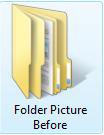
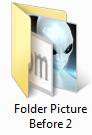
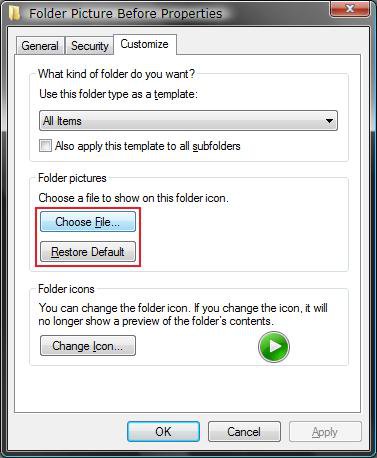
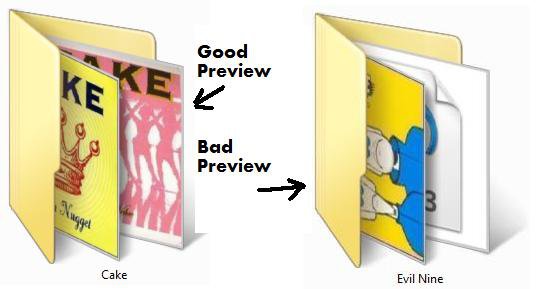
| Vista Ultimate | Re: Folder Preview Picture Change Hi, this is the 1st time I have used a forum, so hope I following the correct code of practice. I have a problem with a few music folders that display 2 preview pictures when all the mp3 files inside the folder are the same. The majority of my music folders have just a single preview picture, as expected. Anyone have an idea? I have tried 'properties/customize/restore default' but that doesn't help. Thank you. |
My System Specs![]() |
| | |
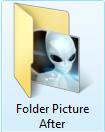
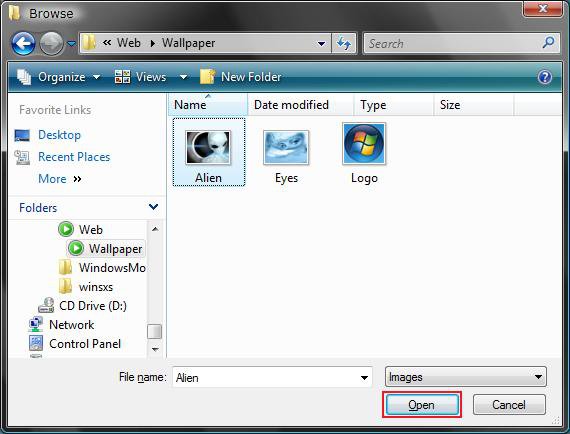
| Vista x64 Ultimate SP2, Windows 7 Ultimate x64 | Re: Folder Preview Picture Change Hi Teldel7, Welcome to Vista Forums. ![]() Did you try to customize (step 3) the ones that have 2 preview pictures to only display the selected image you chose instead? Shawn |
My System Specs![]() |
| | |
| Vista Ultimate | Re: Folder Preview Picture Change Hi Shawn, Thank you. No I didn't try step 3 because there is only 1 picture in the folder which is attached to the mp3 files, however the same picture is displayed twice as a preview picture. When I have had 2 preview pictures displayed in the past, they have been different pictures, similar to your example, and I have been able to change these easily by 'properties/customize/restore default'. However, with the folders that display the same picture twice, this method does not work......... or so I that. When I logged on this morning all the music folders that had duplicated preview pictures now had just a single picture very strange, not sure how that happened, but it may have something to do with the fact that these pictures were 'assigned' the the mp3 files via iTunes, in other words, when I imported the album into iTunes it had no 'cover art', nor did the native mp3 files, therefore I pasted the album cover within iTunes, then whilst browsing my music folder noticed that these albums all had duplicated preview pictures as described above.... sorry beginning to ramble now, but this may help others with a similar problem.I think the outcome is to be patient and check the folders again after the PC has been rebooted. Terry |
My System Specs![]() |
| | |
| Vista x64 Ultimate SP2, Windows 7 Ultimate x64 | Re: Folder Preview Picture Change Terry, I'm happy to hear that your problem has sorted itself out now. Thank you for posting back with your results to help others. Shawn |
My System Specs![]() |
| | |
| Windows Vista Premium Family Edition | Re: Folder Preview Picture Change Hi, this is my first post on this forum. I beg for help about those damn folder preview pictures. The folder preview on my Vista is just absolutely random. When I want to customize the preview picture and chose a new picture (which I do exactly like in the tutorial), it is just as if I had done nothing at all. The worse is that random preview pictures from everywhere on my computer appear on my folders and I can't remove them. I've tried to clear the thumbnail cache but it doesn't change much. Do you have any idea about what I could do ? Thank you |
My System Specs![]() |
| | |
| Vista x64 Ultimate SP2, Windows 7 Ultimate x64 | Re: Folder Preview Picture Change Hello BaronDavis, and welcome to Vista Forums. Have you already tried everything in step 8 to see if that helps any? If you have, then you can use step 4 to restore the default preview image. Hope this helps, Shawn |
My System Specs![]() |
![]() |
| Tutorial Tools | |
| |
Similar Threads | ||||
| Tutorial | Category | |||
| Picture Preview? | General Discussion | |||
| How to change folder icon that can preview images in the folder? | Vista General | |||
| Change Picture folder read only attribute | Vista General | |||
| Change Picture Folder Problem | Vista file management | |||
| Picture icons don't show preview of picture | Vista music pictures video | |||