Windows Vista Forums
Vista Forums Home Join Vista Forums Windows 7 Forum Vista Tutorials Tags
Welcome to Windows Vista Forums. Our forum is dedicated to helping you find solutions with any problems, errors or issues you are experiencing with Windows Vista. The Vista forum also covers news and updates and has an extensive Windows Vista tutorial section that covers a wide range of tips and tricks.

Go Back   Vista Forums > Vista Forums > Tutorials

Vista Tutorial - Folder Preview Picture Change

Comment
 
Old 08-28-2007  
Brink
Administrator


Join Date: Apr 2007
Vista x64 Ultimate SP2, Windows 7 Ultimate x64


Folder Preview Picture Change

How to Change a Folder Preview Picture in Vista
...

My System SpecsSystem Spec
Old 09-21-2008  
barondavis
Newbie


Join Date: Sep 2008
Windows Vista Premium Family Edition


Re: Folder Preview Picture Change

Hi Shawn,

Thanks for replying so fast, I have tried indeed everything in step 8, and done step 4 with no results. About step 8 though, and the A/B/C steps (about hidden files) I'm not too sure because when I choose to display hidden files I see then no "desktop.ini" to delete while changing my folder preview picture.
Other than that, I rebuilt the Icon cache but it didn't change anything, my folder preview pictures are still totally random and I can't change them nor restore the default preview image. I have to say that I have my computer for 3 months and ever since the first day it has been like this.

My System SpecsSystem Spec
Old 09-21-2008  
Brink
Administrator


Join Date: Apr 2007
Vista x64 Ultimate SP2, Windows 7 Ultimate x64


Re: Folder Preview Picture Change

Strange. I have notice that if you did this to a new folder with the folder still named New Folder, that it will sometimes reproduce the preview picture in other location when you create a new folder there to.

I'm not sure why it is doing this for you. I did a test by creating a new folder and naming it test, then changed the folder preview picture to a random JPG file. It displayed only that image and was not reproduced anywhere else.

The only thing I can suggest for you to try is a Repair (upgrade) install to see if it can repair this issue for you.

Repair Install For Vista

Hope this helps,
Shawn
My System SpecsSystem Spec
Old 12-05-2008  
Maico
Newbie


Join Date: Dec 2008
Windows Vista® Home Premium (SP1, 32-bit)


Re: Folder Preview Picture Change

Hi Shawn,

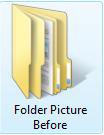
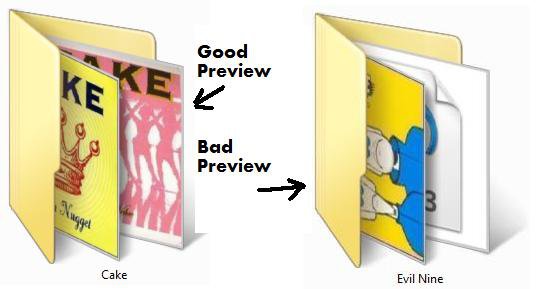
I came across your thread when trying to Google an answer to a similar problem. Do you know how I can change how Vista selects what two thumbnails to display for a folder? You know how Windows normally shows the folder like this picture of yours:

Click the image to open in full size.

I'll try tinkering around with it some more, but Vista seems to randomly select from my folder what two pictures to display. I have several different folders full of pictures, and in one folder, the two thumbnails that are displayed are from the 90th and 91st file. In another folder, the two thumbnails are from the 51st and 52nd file.

I'll try to create a new folder, rename the new folder like you suggested, and then drag in two files that I want two be the two thumbnails. Because those are the only two pictures in the folder, the two thumbnails displayed are the ones I want, but not necessarily in the order I want. It seems that the two thumbnails are displayed from front to back by alphabet.

Anyway, I'll keep dragging in more files into that new folder, and the two thumbnails from the first two files I dragged in stay put. I'm happy at this point, so I proceed to drag in more and more files, until I drag in the 51st and 52nd file that I mentioned above. Then all of a sudden, no matter how many more pictures I add, the two thumbnails for the folder will magically revert to the 51st and 52nd file, and there is no way to change it. This really pisses me off, and I don't know why Vista would just arbitrarily pick two random pictures to set as the folder thumbnail.

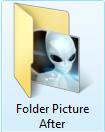
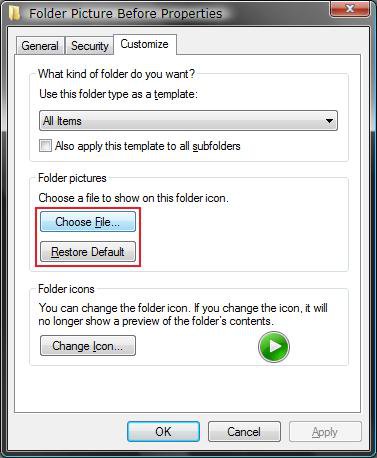
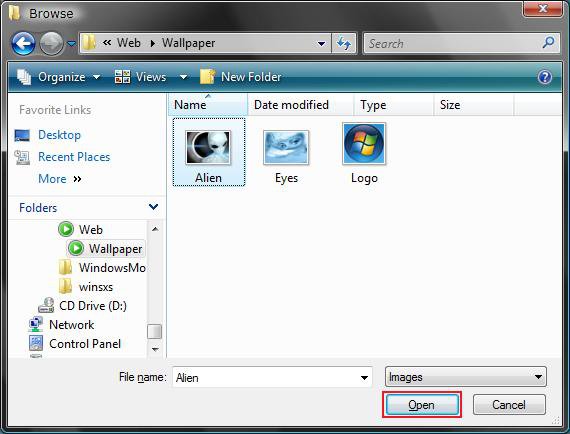
I have been able to change the folder thumbnail by using a custom picture like you show in the tutorial, but that only shows one picture thumbnail, and I like Vista's new preview that shows two thumbnails in the folder. So I've been trying to figure out a way to be able to select which two thumbnails Vista displays, but to no avail. You can't select more than one picture when you use a custom thumbnail, and the desktop.ini file offers no clues or anything to try to select what pictures I want for the two thumbnails. Clearing the thumbnail cache and resetting defaults doesn't do anything either, and the problem just reoccurs.

This may be really confusing, but I'm going to tinker around with this some more. And then if possible, I will take some screenshots or try to record my display while I am doing what I am talking about above to show you what I mean. I just got this laptop on Black Friday, and this is the first time I've played around with Vista, so I don't know much about it or how to customize it to my tastes. Hopefully an easy solution is out there, and I just haven't located it yet. If anyone else knows how to do this, please let me know. Thanks.
My System SpecsSystem Spec
Old 12-05-2008  
Brink
Administrator


Join Date: Apr 2007
Vista x64 Ultimate SP2, Windows 7 Ultimate x64


Re: Folder Preview Picture Change

Hello Maico, and welcome to Vista Forums.

This feature of Vista has always been, well let's just say a bit buggy.

A workaround that seems to have worked the best is to have the main folder with only one image in it, that you want to display on th folder, then create a subfolder in that folder for all of your other images.
My System SpecsSystem Spec
Old 02-01-2009  
SrBrits
Newbie


Join Date: Feb 2009
Vista Ultimate x64


Re: Folder Preview Picture Change

Hello guys!

Well, i don't know if some one already post this, but ill share it anyway.
So my problem was that i couldn't put a picture as a folder's thumbnail without deleting the "thumbnails" in the Cleaning Disk Tool after or before selecting the image i wanted for the folder. This was very anoying, i mean having to do this every time i wanted to change a thumbnail or asing one.

So here is what i found so far: folders that were created in a Windows XP cause some kind of problem when u want to change its thumbnail in Vista x64. I found this cuz the folders i couldn't personalize with the image that i wanted were backup files from my old computer.

Solution? well, now im just creating a new folder in Vista for every old folder, and erasing the old ones and it worked. No more opening the Cleaning Disk Tool every time i want to change its thumbnail.

Well, i hope this helps anyone out there who has the same problem as i did.

Cheers!!

Last edited by SrBrits; 02-01-2009 at 04:56 AM..
My System SpecsSystem Spec
Old 02-01-2009  
Brink
Administrator


Join Date: Apr 2007
Vista x64 Ultimate SP2, Windows 7 Ultimate x64


Re: Folder Preview Picture Change

Thank you for sharing your results Srbrits, and welcome to Vista Forums.

Shawn
My System SpecsSystem Spec
Comment

Tutorial Tools


Similar Threads
Tutorial Category
Picture Preview? General Discussion
How to change folder icon that can preview images in the folder? Vista General
Change Picture folder read only attribute Vista General
Change Picture Folder Problem Vista file management
Picture icons don't show preview of picture Vista music pictures video


Vista Forums is an independent web site and has not been authorized,
sponsored, or otherwise approved by Microsoft Corporation.
"Windows Vista", the Start Orb, and related materials are trademarks of Microsoft Corp.
© Designer Media Ltd
Tutorial powered by GARS 2.1.8m ©2005-2006

1 2 3 4 5 6 7 8 9 10 11 12 13 14 15 16 17 18 19 20 21 22 23 24 25 26 27 28 29 30 31 32 33 34 35 36 37 38 39 40 41 42 43 44 45 46