
How to Add "Copy To Folder" and "Move To Folder" to the Context Menu in Vista
 Information
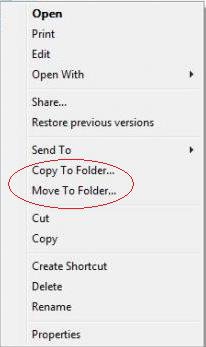
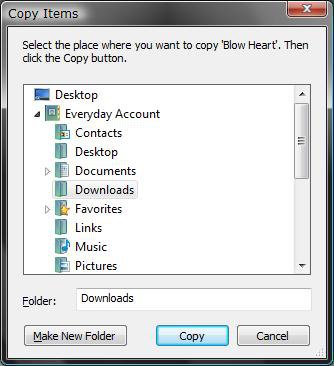
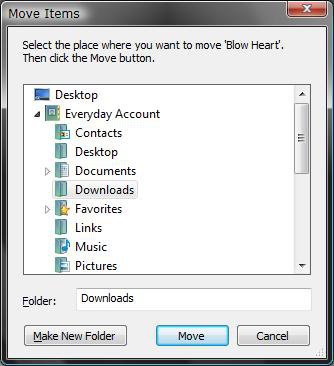
Copy To Folder allows you to right click on a item and copy it to another location immediately. Move to Folder allows you to right click on a item and move it to another locatation and remove it from it's current location immediately.
 Note
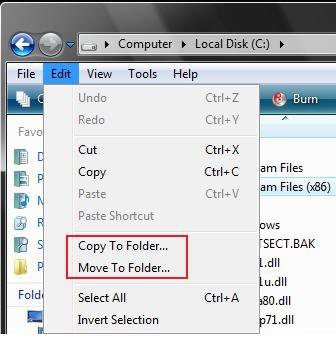
NoteThis is also under the EDIT menu in a Explorer window. (See Example screenshot below)
EXAMPLE: Default Edit Menu Location:
NOTE: These are the keyboard shortcuts to use the Menu bar location while having the file or folder selected that you want to Copy or Move to another folder.
- Copy To Folder - Press and hold Alt then press E and F
- Move To Folder - Press and hold Alt then press E and V
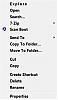
EXAMPLE: Copy To Folder and Move To Folder Added to the Context Menu:NOTE: Right click on a file or folder to see your new additions. You can see what happens when you click on each one beside the context menu screenshot. You can select a different drive to.
 METHOD ONE
1. To Add Copy/Move To Folder
A) Click on the download button below to download the file below.
NOTE: You can add one or both of these.
Add_CopyMove.reg

B) Go to step 3.
2. To Remove Copy/Move To Folder
A) Click on the download button below to download the file below.
Remove_CopyMove.reg
3. Click on Save, and save the .reg file to the Desktop.
4. Right click on the downloaded .reg file and click on Merge.
5. Click on Run, Continue (UAC), Yes, and then OK when prompted.
6. When done, you can delete the downloaded .reg file if you like.
METHOD TWO 1. Open the Start Menu.
2. In the white line (Start Search) area, type regedit and press Enter.
3. Click on Continue in the UAC prompt.
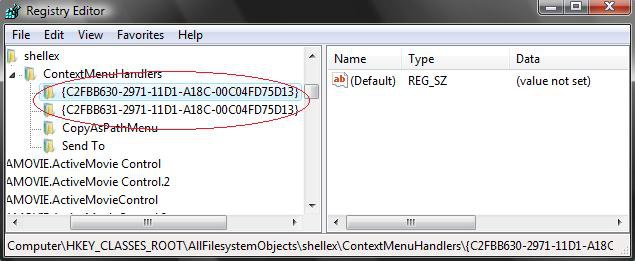
4. In regedit, go to: (See screenshot below)
HKEY_CLASSES_ROOT\AllFilesystemObjects\shellex\ContextMenuHandlers
5. To Add Copy To Folder
A) In the left pane, right click on ContextMenuHandlers and click on New and Key.
B) Type {C2FBB630-2971-11D1-A18C-00C04FD75D13} and press Enter.
NOTE: To Remove Copy To Folder - Right click on this key and click on Delete.
6. To Add Move To Folder
A) In the left pane, right click on ContextMenuHandlers and click on New and Key.
B) Type {C2FBB631-2971-11D1-A18C-00C04FD75D13} and press Enter.
NOTE: To Remove Move To Folder - Right click on this key and click on Delete.
7. Close regedit.
That's it,
Shawn
Related Tutorials
- How to Expand the Context (Shortcuts) Menu in Vista
- How to Customize the Context Menu for the Start Menu in Vista
- How to Customize the Send To Context Menu in Vista
- How to Customize the Recycle Bin Context Menu in Vista
- How to Add Encrypt and Decrypt to the Context Menu in Vista
- How to Add and Remove a New Menu Item in Vista
- How to Add Take Ownership to the Context Menu in Vista
- How to Copy the Full Path of a File or Folder in Vista
- How to Add Flip 3D to the Context Menu in Vista
- How to Restore or Remove New from the Context Menu in Vista
- How to Enable or Disable the Context Menu in Vista
- How to Remove or Show Drives in the Vista and Windows 7 "Send To" Context Menu
- How to Add "View and Print File Directory" to the Context Menu in Vista
- How to Add or Remove "Copy as Path" from the Vista Context Menu
- How to Add or Remove Send To from the Vista Context Menu
- How to Add or Remove Turn Aero On or Off from the Vista Context Menu
- How to Add System Properties to Computer Context Menu in Vista
- How to Restore or Remove "Restore Previous Versions" from the Vista Context Menu
- How to Add Empty Folder and Subfolders to the Vista Context Menu
- How to Add "Copy to Clipboard" to the Context Menu in Windows 7 and Vista
Attachments
Last edited by a moderator:


 Ted
Ted

