Windows Vista Forums
Vista Forums Home Join Vista Forums Windows 7 Forum Vista Tutorials Tags
Welcome to Windows Vista Forums. Our forum is dedicated to helping you find solutions with any problems, errors or issues you are experiencing with Windows Vista. The Vista forum also covers news and updates and has an extensive Windows Vista tutorial section that covers a wide range of tips and tricks.

Go Back   Vista Forums > Vista Forums > Tutorials

Vista Tutorial - Favorite Links - Hide

Comment
 

Favorite Links - Hide

How to Hide Favorite Links in a Windows Explorer Window in Vista
Published by Brink
09-08-2007

How to Hide Favorite Links in a Windows Explorer Window in Vista

Information
  This will show you how to hide or unhideFavorite Links inside the Navigation Pane in a Windows Explorer window. It contains shortcuts to the Documents, Pictures, Music, Recently Changed, Searches, and Public folders by default. For more information see: Microsoft Help and Support: Article KB926167
Tip
  The Favorite Links folder is located at: C:\Users\(your username)\Links
NOTE
 
  • The Navigation Pane contains both the Favorite Links and Folders sections. You cannot turn off just one of these sections, only hide or adjust the size for one of them. If you turn off the Navigation Pane, you will turn off both of these sections as well.
  • If the Favorite Links section is empty, then see: How to Fix Favorite Links Empty in Vista Windows Explorer
RELATED LINKS:

Here's How:
1. Open a Windows Explorer window.

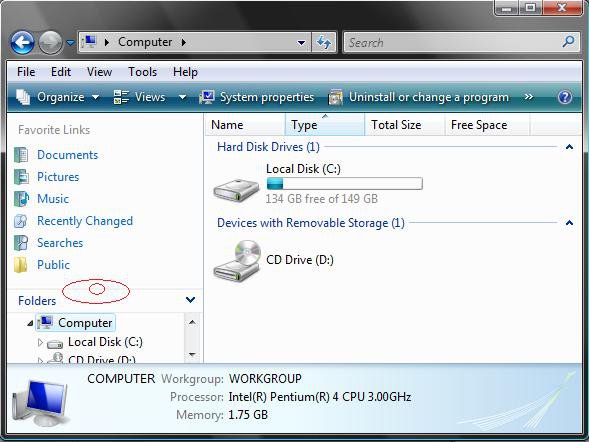
2. Move your mouse pointer on the line between the Favorite Links and Folders sections until it turns into a double arrow. (See screenshot below)
before.jpg
3. Hold the left mouse button down, while the mouse pointer is a double arrow, and drag the section up to hide it. (See screenshot below)
NOTE: To unhide it just drag it back down.
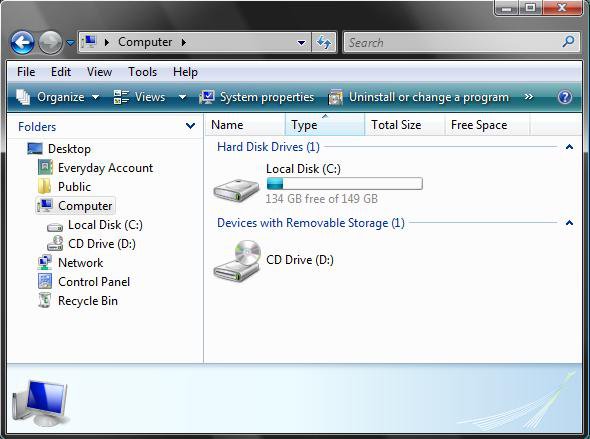
after.jpg
That's it,
Shawn

Published by
Brink's Avatar
Administrator

Join Date: Apr 2007
Location: Texas, USA
Posts: 25,817
Rep Power: 150
Brink has a reputation beyond reputeBrink has a reputation beyond reputeBrink has a reputation beyond reputeBrink has a reputation beyond reputeBrink has a reputation beyond reputeBrink has a reputation beyond reputeBrink has a reputation beyond reputeBrink has a reputation beyond reputeBrink has a reputation beyond reputeBrink has a reputation beyond reputeBrink has a reputation beyond repute

Tutorial Tools

Applies to
All Vista Versions
64 Bit & 32 Bit

Old 03-18-2008  
Bare Foot Kid
Technophile Wannabe


Join Date: Feb 2008
Vista 64-bit Ultimate Win7 64-bit Ultimate XP SP3 32-bit Pro


Thumbs up Re: Favorite Links - Hide

Hi Brink

Thats kind of odd, and easy but I like it better.
I never would of thought of it.


Thanks Ted

My System SpecsSystem Spec
Old 03-18-2008  
Brink
Administrator


Join Date: Apr 2007
Vista x64 Ultimate SP2, Windows 7 Ultimate x64


Re: Favorite Links - Hide

I do like it when they make it easy for a change.
My System SpecsSystem Spec
Comment

Tutorial Tools


Similar Threads
Tutorial Category
Number of links in favorite links in Windows Explorer Vista General
Hide Favorite Links pane in Window Vista file management
My favorite links are gone... Vista file management
Change links under "Favorite Links" in Windows Explorer pane? Vista General
Change links under "Favorite Links" in Windows Explorer pane? Vista mail


Vista Forums is an independent web site and has not been authorized,
sponsored, or otherwise approved by Microsoft Corporation.
"Windows Vista", the Start Orb, and related materials are trademarks of Microsoft Corp.
© Designer Media Ltd
Tutorial powered by GARS 2.1.8m ©2005-2006

1 2 3 4 5 6 7 8 9 10 11 12 13 14 15 16 17 18 19 20 21 22 23 24 25 26 27 28 29 30 31 32 33 34 35 36 37 38 39 40 41 42 43 44 45 46