
How to Use the Vista Shell Command
 Information
This will show you how to use the Shell command to enable you to quickly open a hard to find folder or object. A complete list of all Shell commands is included with a description of each.
 Note
NoteYou can also use these shell commands from the Run command window.
 Tip
TipWhen the item for the shell command opens the folder, you can then create a shortcut to it easily.
Here's How:
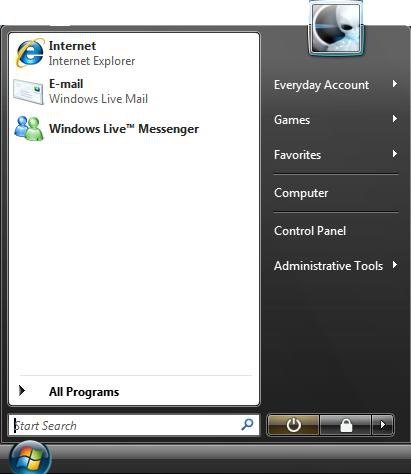
1. Open the Start Menu.
2. In the white line (Start Search) area, type one of the Shell commands (See table below) and press Enter. (See screenshot below)
Complete List of Shell Commands
[TABLE=class:-grid,-width:-700][TR][TD]
Shell Command
[/TD]
[TD]
Description
[/TD][/TR]
[TR][TD]
shell:AddNewProgramsFolder
[/TD]
[TD]
Opens the Install a program from the network location.
[/TD][/TR]
[TR][TD]
shell:Administrative Tools
[/TD]
[TD]
Opens the Administrative Tools section of the Control Panel.
[/TD][/TR]
[TR][TD]
shell:AppData
[/TD]
[TD]
Opens the hidden location C:\Users\(your username)\AppData\Roaming
[/TD][/TR]
[TR][TD]
shell:AppUpdatesFolder
[/TD]
[TD]
Opens the Installed Windows Updates location in Program and Files.
[/TD][/TR]
[TR][TD]
shell:Cache
[/TD]
[TD]
Opens Internet Explorer’s temporary internet files folder.
[/TD][/TR]
[TR][TD]
shell:CD Burning
[/TD]
[TD]
Opens the location where files are stored temporarily before Windows Vista burns them.
[/TD][/TR]
[TR][TD]
shell:ChangeRemoveProgramsFolder
[/TD]
[TD]
Opens Programs and Features in the Control Panel.
[/TD][/TR]
[TR][TD]
shell:Common Administrative Tools
[/TD]
[TD]
Opens the Administrative Tools section of the Control Panel.
[/TD][/TR]
[TR][TD]
shell:Common AppData
[/TD]
[TD]
Opens the hidden location C:\ProgramData
[/TD][/TR]
[TR][TD]
shell:Common Desktop
[/TD]
[TD]
Opens the Public Users Desktop folder location. C:\Users\Public\Desktop
[/TD][/TR]
[TR][TD]
shell:Common Documents
[/TD]
[TD]
Opens the Public Users Documents folder location. C:\Users\Public\Documents
[/TD][/TR]
[TR][TD]
shell:Common Programs
[/TD]
[TD]
Opens the Start menu shortcuts location.
[/TD][/TR]
[TR][TD]
shell:Common Start Menu
[/TD]
[TD]
Opens the location of the shortcut links in your Start Menu.
[/TD][/TR]
[TR][TD]
shell:Common Startup
[/TD]
[TD]
Opens the location where shortcuts to programs that are set to start when Vista boots up are saved.
[/TD][/TR]
[TR][TD]
shell:Common Templates
[/TD]
[TD]
Opens C:\ProgramData\Microsoft\Windows\Templates
[/TD][/TR]
[TR][TD]
shell:CommonDownloads
[/TD]
[TD]
Opens the Public Users Downloads folder location. C:\Users\Public\Downloads
[/TD][/TR]
[TR][TD]
shell:CommonMusic
[/TD]
[TD]
Opens the Public Users Music folder location. C:\Users\Public\Music
[/TD][/TR]
[TR][TD]
shell:CommonPictures
[/TD]
[TD]
Opens the Public Users Pictures folder location. C:\Users\Public\Pictures
[/TD][/TR]
[TR][TD]
shell:CommonVideo
[/TD]
[TD]
Opens the Public Users Video folder location. C:\Users\Public\Videos
[/TD][/TR]
[TR][TD]
shell:ConflictFolder
[/TD]
[TD]
Opens the Sync Center Conflicts location.
[/TD][/TR]
[TR][TD]
shell:ConnectionsFolder
[/TD]
[TD]
Quickly open Network Connections.
[/TD][/TR]
[TR][TD]
shell:Contacts
[/TD]
[TD]
Opens your username's Contacts folder location.
[/TD][/TR]
[TR][TD]
shell:ControlPanelFolder
[/TD]
[TD]
Opens the Control Panel.
[/TD][/TR]
[TR][TD]
shell:Cookies
[/TD]
[TD]
Opens one of the folders where Internet Explorer saves cookies.
[/TD][/TR]
[TR][TD]
shell:Cookies\Low
[/TD]
[TD]
Opens the other folder where Internet Explorer saves cookies.
[/TD][/TR]
[TR][TD]
shell:CredentialManager
[/TD]
[TD]
Opens the hidden C:\Users\(your username)\AppData\Roaming\Microsoft\Credentials
[/TD][/TR]
[TR][TD]
shell:CryptoKeys
[/TD]
[TD]
Opens the hidden C:\Users\(your username)\AppData\Roaming\Microsoft\Crypto
[/TD][/TR]
[TR][TD]
shell:CSCFolder
[/TD]
[TD]
unknown
[/TD][/TR]
[TR][TD]
shell:default Gadgets
[/TD]
[TD]
Opens the default Windows Sidebar Gadgets location.
[/TD][/TR]
[TR][TD]
shell:desktop
[/TD]
[TD]
Opens your personal username's Desktop folder location.
[/TD][/TR]
[TR][TD]
shell:downloads
[/TD]
[TD]
Opens your personal username's Downloads folder location.
[/TD][/TR]
[TR][TD]
shell:dpapiKeys
[/TD]
[TD]
Opens the hidden C:\Users\(your username)\AppData\Roaming\Microsoft\Protect
[/TD][/TR]
[TR][TD]
shell:Favorites
[/TD]
[TD]
Opens your personal username's Favorites folder location.
[/TD][/TR]
[TR][TD]
shell:Fonts
[/TD]
[TD]
Opens Vista's Fonts folder location.
[/TD][/TR]
[TR][TD]
shell:Gadgets
[/TD]
[TD]
Opens your user account's Windows Sidebar Gadgets that you saved location.
[/TD][/TR]
[TR][TD]
shell:Games
[/TD]
[TD]
Opens the Games Explorer from the right Start menu Games button location.
[/TD][/TR]
[TR][TD]
shell:GameTasks
[/TD]
[TD]
Opens the hidden C:\Users\(your username)\AppData\Local\Microsoft\Windows\GameExplorer
[/TD][/TR]
[TR][TD]
shell:History
[/TD]
[TD]
Opens Internet Explorer’s history of websites visited.
[/TD][/TR]
[TR][TD]
shell:InternetFolder
[/TD]
[TD]
Opens the 32 bit Internet Explorer.
[/TD][/TR]
[TR][TD]
shell:Links
[/TD]
[TD]
Opens your personal username's Links folder location.
[/TD][/TR]
[TR][TD]
shell:Local AppData
[/TD]
[TD]
Opens the hidden C:\Users\(your username)\AppData\Local
[/TD][/TR]
[TR][TD]
shell:LocalAppDataLow
[/TD]
[TD]
Opens the hidden C:\Users\(your username)\AppData\LocalLow
[/TD][/TR]
[TR][TD]
shell:LocalizedResourcesDir
[/TD]
[TD]
unknown
[/TD][/TR]
[TR][TD]
shell:MAPIFolder
[/TD]
[TD]
unknown
[/TD][/TR]
[TR][TD]
shell:My Music
[/TD]
[TD]
Opens your personal username's Music folder location.
[/TD][/TR]
[TR][TD]
shell:My Pictures
[/TD]
[TD]
Opens your personal username's Pictures folder location.
[/TD][/TR]
[TR][TD]
shell:My Video
[/TD]
[TD]
Opens your personal username's Video folder location.
[/TD][/TR]
[TR][TD]
shell:MyComputerFolder
[/TD]
[TD]
Opens Computer window.
[/TD][/TR]
[TR][TD]
shell:NetHood
[/TD]
[TD]
Opens Network Shortcuts folder location.
[/TD][/TR]
[TR][TD]
shell:NetworkPlacesFolder
[/TD]
[TD]
Opens the Network Places location.
[/TD][/TR]
[TR][TD]
shell:OEM Links
[/TD]
[TD]
Opens the links placed on your computer by your computer manufacturer location.
[/TD][/TR]
[TR][TD]
shell:Original Images
[/TD]
[TD]
Opens Windows Photo Gallery Original Images folder location.
[/TD][/TR]
[TR][TD]
shell
 ersonal
[/TD]
[TD]
Opens your personal username's Documents folder location.
[/TD][/TR]
[TR][TD]
shell
hotoAlbums[/TD]
[TD]
Opens the Slide Show folder location for your username's Pictures folder.
[/TD][/TR]
[TR][TD]
shell
laylists[/TD]
[TD]
Opens the Playlists folder location for your username's Music folder.
[/TD][/TR]
[TR][TD]
shell
rintersFolder[/TD]
[TD]
Opens Printers in the Control Panel.
[/TD][/TR]
[TR][TD]
shell
rintHood[/TD]
[TD]
Opens the Printer Shortcuts location.
[/TD][/TR]
[TR][TD]
shell
rofile[/TD]
[TD]
Opens your main username folder location.
[/TD][/TR]
[TR][TD]
shell
rogramFiles[/TD]
[TD]
Opens the Program Files folder.
[/TD][/TR]
[TR][TD]
shell
rogramFilesCommon[/TD]
[TD]
Opens the Common Files folder in Program Files.
[/TD][/TR]
[TR][TD]
shell
rogramFilesCommonX86[/TD]
[TD]
Opens the Common Files folder in Program Files (x86).
[/TD][/TR]
[TR][TD]
shell
rogramFilesX86[/TD]
[TD]
Opens the Program Files (x86) folder.
[/TD][/TR]
[TR][TD]
shell
rograms[/TD]
[TD]
Opens the Start menu's Programs shortcuts location.
[/TD][/TR]
[TR][TD]
shell
ublic[/TD]
[TD]
Opens the Public User folder.
[/TD][/TR]
[TR][TD]
shell
ublicGameTasks[/TD]
[TD]
Opens C:\ProgramData\Microsoft\Windows\GameExplorer
[/TD][/TR]
[TR][TD]
shell:Quick Launch
[/TD]
[TD]
Opens the Quick Launch shortcuts folder location.
[/TD][/TR]
[TR][TD]
shell:Recent
[/TD]
[TD]
Opens Recent Items location.
[/TD][/TR]
[TR][TD]
shell:RecycleBinFolder
[/TD]
[TD]
Opens the Recycle Bin folder.
[/TD][/TR]
[TR][TD]
shell:ResourceDir
[/TD]
[TD]
Opens Vista's Resources folder location.
[/TD][/TR]
[TR][TD]
shell:SampleMusic
[/TD]
[TD]
Opens the Sample Music folder in the Public Users folder.
[/TD][/TR]
[TR][TD]
shell:SamplePictures
[/TD]
[TD]
Opens the Sample Pictures folder in the Public Users folder.
[/TD][/TR]
[TR][TD]
shell:SamplePlaylists
[/TD]
[TD]
Opens the Sample Playlist folder in the Public Users folder.
[/TD][/TR]
[TR][TD]
shell:SampleVideos
[/TD]
[TD]
Opens the Sample Videos folder in the Public Users folder.
[/TD][/TR]
[TR][TD]
shell:SavedGames
[/TD]
[TD]
Opens your personal username's Saved Games folder location.
[/TD][/TR]
[TR][TD]
shell:Searches
[/TD]
[TD]
Opens your personal username's Searches folder location.
[/TD][/TR]
[TR][TD]
shell:SendTo
[/TD]
[TD]
Opens the Context menu's SendTo folder location.
[/TD][/TR]
[TR][TD]
shell:Start Menu
[/TD]
[TD]
Opens the current single user location of the shortcut links in your Start Menu.
[/TD][/TR]
[TR][TD]
shell:Startup
[/TD]
[TD]
Opens the location where shortcuts to programs that are set to start when Vista boots up are saved.
[/TD][/TR]
[TR][TD]
shell:SyncCenterFolder
[/TD]
[TD]
Opens Sync Center from the Control Panel.
[/TD][/TR]
[TR][TD]
shell:SyncResultsFolder
[/TD]
[TD]
Opens the Sync Results for the Sync Center.
[/TD][/TR]
[TR][TD]
shell:SyncSetupFolder
[/TD]
[TD]
Open the Setup new sync partnerships in the Sync Center.
[/TD][/TR]
[TR][TD]
shell:System
[/TD]
[TD]
Opens the System32 folder location.
[/TD][/TR]
[TR][TD]
shell:SystemCertificates
[/TD]
[TD]
Opens the SystemCertificates folder location.
[/TD][/TR]
[TR][TD]
shell:SystemX86
[/TD]
[TD]
Opens the SysWowxx folder location.
[/TD][/TR]
[TR][TD]
shell:Templates
[/TD]
[TD]
Opens the Templates folder location.
[/TD][/TR]
[TR][TD]
shell:TreePropertiesFolder
[/TD]
[TD]
unknown
[/TD][/TR]
[TR][TD]
shell:UserProfiles
[/TD]
[TD]
Opens the "C:\Users" location.
[/TD][/TR]
[TR][TD]
shell:UsersFilesFolder
[/TD]
[TD]
Opens your main username folder location.
[/TD][/TR]
[TR][TD]
shell:Windows
[/TD]
[TD]
Opens the "C:\Windows" location.
[/TD][/TR][/TABLE]
Attachments

Last edited by a moderator:


