

You are using an out of date browser. It may not display this or other websites correctly.
You should upgrade or use an alternative browser.
You should upgrade or use an alternative browser.
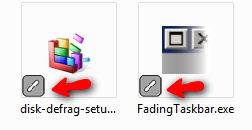
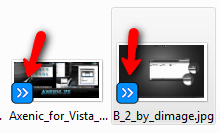
Weird icons after sp2 update
- Thread starter sourpuss
- Start date
sourpuss
New Member
Whoops, I may not need help...just a couple minutes more research and I find out it has something to do with norton 360. Now all I have to do is figure out how to turn off overlays since I'm not even using norton's backup...uses 100% cpu and then quits responding.
My Computer

Frostmourne
Banned
Look in the backup settings, and what are your specs? Norton doesn't hit 100% very often, practically never actually.
My Computer
System One
-
- Manufacturer/Model
- Sony Vaio Z46GDU
- CPU
- [email protected] w/6MB L2 cache 1066MHz FSB
- Memory
- 6GB DDR3 1066MHz SDRAM
- Graphics card(s)
- 9300M GS 256MB + Intel Integrated 4500MHD
- Monitor(s) Displays
- 13.1" WXGA True Colour Tough
- Screen Resolution
- 1600x900
- Hard Drives
- 320GB SATA 7200RPM
- Internet Speed
- 1MB/s

Flavius
Expelled
It shouldn't be any problem-sometimes it happen.Read this tutorial:http://www.vistax64.com/tutorials/67615-shortcut-arrow.htmlWhoops, I may not need help...just a couple minutes more research and I find out it has something to do with norton 360. Now all I have to do is figure out how to turn off overlays since I'm not even using norton's backup...uses 100% cpu and then quits responding.
Disable for the moment shortcut arrows and next enable again
My Computer
Frostmourne
Banned
It shouldn't be any problem-sometimes it happen.Read this tutorial:http://www.vistax64.com/tutorials/67615-shortcut-arrow.htmlWhoops, I may not need help...just a couple minutes more research and I find out it has something to do with norton 360. Now all I have to do is figure out how to turn off overlays since I'm not even using norton's backup...uses 100% cpu and then quits responding.
Disable for the moment shortcut arrows and next enable again
Apparently its Norton, not Vista

My Computer
System One
-
- Manufacturer/Model
- Sony Vaio Z46GDU
- CPU
- [email protected] w/6MB L2 cache 1066MHz FSB
- Memory
- 6GB DDR3 1066MHz SDRAM
- Graphics card(s)
- 9300M GS 256MB + Intel Integrated 4500MHD
- Monitor(s) Displays
- 13.1" WXGA True Colour Tough
- Screen Resolution
- 1600x900
- Hard Drives
- 320GB SATA 7200RPM
- Internet Speed
- 1MB/s
Flavius
Expelled
It shouldn't be any problem-sometimes it happen.Read this tutorial:http://www.vistax64.com/tutorials/67615-shortcut-arrow.htmlWhoops, I may not need help...just a couple minutes more research and I find out it has something to do with norton 360. Now all I have to do is figure out how to turn off overlays since I'm not even using norton's backup...uses 100% cpu and then quits responding.
Disable for the moment shortcut arrows and next enable again
Apparently its Norton, not Vista
Many applications disturb icon and uninstalling them not always resolve problems
 .Example http://www.vistax64.com/general-discussion/207087-desktop-icon-problems.html
My Computer
sourpuss
New Member
Thanks, I've got it figured out. @Flavius, it wasn't shortcut overlays..I've had vista shortcut manager installed for some time.
It was definitely Norton. I had tried to set up the backup options in Norton 360, but every time I so much as opened the window to adjust the settings, cpu would spike and stay spiked...couldn't do anything at all except wonder when my tower was going to take flight. Then Norton would stop responding, and I would end up having to reboot. I finally got sick of dealing with it and just decided not to use backup, but somewhere along the line I must have enabled those icon overlays.
@Frostmourne, if you know anything about Norton, I sure would like to know how to get control of that ccsvchst process. It just goes crazy sometimes!
It was definitely Norton. I had tried to set up the backup options in Norton 360, but every time I so much as opened the window to adjust the settings, cpu would spike and stay spiked...couldn't do anything at all except wonder when my tower was going to take flight. Then Norton would stop responding, and I would end up having to reboot. I finally got sick of dealing with it and just decided not to use backup, but somewhere along the line I must have enabled those icon overlays.
@Frostmourne, if you know anything about Norton, I sure would like to know how to get control of that ccsvchst process. It just goes crazy sometimes!
My Computer
Flavius
Expelled
You seem have to many issues with this antivirus.I suggest to change antivirus...
My Computer
Frostmourne
Banned
Right now, Norton is using 10mb RAM out of 6GB DDR3. As to the spike check what are your laptop specs? If you are using any other real-time shield antivirus/antispyware get rid of it. Norton is worth keeping, but if you decide to uninstall it use the Norton Removal Tool. I would recommend Kaspersky if you do.
Before that though, what are your specs and what does Norton say in your security history? The setting as I said are in backup, then details, then overlays.
Before that though, what are your specs and what does Norton say in your security history? The setting as I said are in backup, then details, then overlays.
My Computer
System One
-
- Manufacturer/Model
- Sony Vaio Z46GDU
- CPU
- [email protected] w/6MB L2 cache 1066MHz FSB
- Memory
- 6GB DDR3 1066MHz SDRAM
- Graphics card(s)
- 9300M GS 256MB + Intel Integrated 4500MHD
- Monitor(s) Displays
- 13.1" WXGA True Colour Tough
- Screen Resolution
- 1600x900
- Hard Drives
- 320GB SATA 7200RPM
- Internet Speed
- 1MB/s
sourpuss
New Member
Yes, I had mentioned that I cured the overlay issue. The rest really isn't an issue as long as ccsvchst behaves. When it gets jacked up, it stays there awhile, even after I close out any open Norton windows. And this has only been the last day or two that I've even had the issue...since 360 starting telling me I should run backup.
@Flavius, I just upgraded to Norton360 from NIS, and since I'm not made of $, changing again's not an option
I'm running a desktop, Vista x86 sp2, amd 64 x2 dual core 6000+, 3GB ram...really shouldn't have trouble running this and never have in the past with NIS.
Anyhow, this is what I get just opening N360. If I dare do anything at all concerning backup, it shoots to 98-100%.
Btw, security history says LOTS...don't know what you'd want me to share with you. I notice right off the bat, lots of instances of ping.exe trying to access the internet...don't know what that is. Oh, and yes....I use spyware terminator too, as well as winpatrol.
@Flavius, I just upgraded to Norton360 from NIS, and since I'm not made of $, changing again's not an option
I'm running a desktop, Vista x86 sp2, amd 64 x2 dual core 6000+, 3GB ram...really shouldn't have trouble running this and never have in the past with NIS.
Anyhow, this is what I get just opening N360. If I dare do anything at all concerning backup, it shoots to 98-100%.
Btw, security history says LOTS...don't know what you'd want me to share with you. I notice right off the bat, lots of instances of ping.exe trying to access the internet...don't know what that is. Oh, and yes....I use spyware terminator too, as well as winpatrol.
Attachments

My Computer
Frostmourne
Banned
Uninstall spyware terminator, then use the Norton Removal Tool to uninstall Norton, then reinstall Norton.
My Computer
System One
-
- Manufacturer/Model
- Sony Vaio Z46GDU
- CPU
- [email protected] w/6MB L2 cache 1066MHz FSB
- Memory
- 6GB DDR3 1066MHz SDRAM
- Graphics card(s)
- 9300M GS 256MB + Intel Integrated 4500MHD
- Monitor(s) Displays
- 13.1" WXGA True Colour Tough
- Screen Resolution
- 1600x900
- Hard Drives
- 320GB SATA 7200RPM
- Internet Speed
- 1MB/s
sourpuss
New Member
Thanks for the advice It's a bit more trouble than I want to go to right now, especially since it's really not much of a problem since I disabled backup, but I will keep it in mind for when I have more energy and time
It's a bit more trouble than I want to go to right now, especially since it's really not much of a problem since I disabled backup, but I will keep it in mind for when I have more energy and time