R Riley hayden New Member Sep 5, 2016 #1 My PC shows registry error and blue screen to me. what should i do, please help me. My Computer System One
townsbg ~~тσωηsвg~~ Vista Guru Gold Member Sep 5, 2016 #2 Re: Blue screen and registry error We need to know what the blue screen says. Have you tried safe mode? My Computers System One System Two Operating System Windows 8.1 Industry Pro x64 Manufacturer/Model HP Pavillion Elite HPE-250f CPU Intel i7 860 Quad core 2.8 ghz Memory 8 gb Graphics card(s) ATI Radeon HD 5770 1 gb ram Monitor(s) Displays Alienware 25 AW2521HF Screen Resolution 1920x1080 &1680x1050 Hard Drives 1 TB x2 Other Info https://www.cnet.com/products/hp-pavilion-elite-hpe-250f/ Operating System Windows 2012 R2 Data center/Linux Mint Manufacturer/Model Dell Poweredge T140 CPU i3 9100 3.6GHz, 8M cache, 4C/4T Memory 8GB 2666MT/s DDR4 ECC UDIMM Screen Resolution 1680x1050 Hard Drives 1 TB & 360 GB x2 Other Info https://www.dell.com/en-us/work/shop/productdetailstxn/poweredge-t140?~ck=bt
Re: Blue screen and registry error We need to know what the blue screen says. Have you tried safe mode?
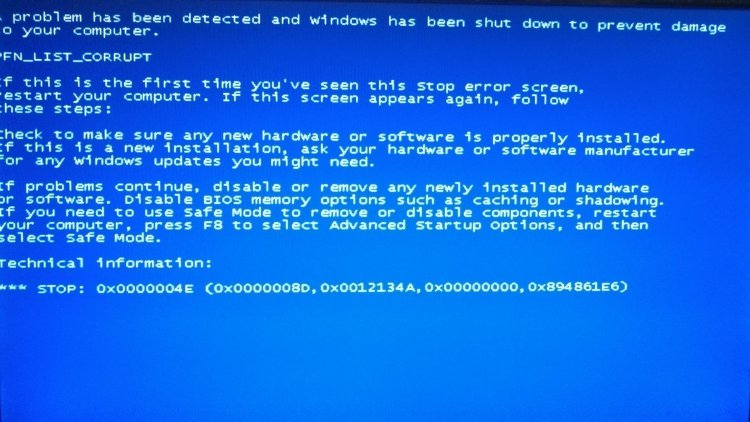
R Riley hayden New Member Sep 6, 2016 #3 Re: Blue screen and registry error It shows something like this.... What should i do please help me. My Computer System One
richc46 Vista Guru Gold Member Sep 6, 2016 #4 Welcome Riley The members of our Forum try to give the best help possible. You can help us by supplying the following information. http://www.vistax64.com/crashes-debugging/282419-blue-screen-death-bsod-posting-instructions.html In addition, I have moved your post to our Crash and Debugging section. My Computer System One Manufacturer/Model Dell XPS420 Memory 6 gig Graphics card(s) ATI Radeon HD3650 256 MB Sound Card Intergrated 7.1 Channel Audio Monitor(s) Displays Dell SP2009W 20 inch Flat Panel w Webcam Hard Drives 640 gb Cooling Fan Mouse Dell USB 4 button optical Keyboard Dell USB Other Info DSL provided by ATT
Welcome Riley The members of our Forum try to give the best help possible. You can help us by supplying the following information. http://www.vistax64.com/crashes-debugging/282419-blue-screen-death-bsod-posting-instructions.html In addition, I have moved your post to our Crash and Debugging section.
R Riley hayden New Member Sep 15, 2016 #5 Thank you Richard for your suggestion, i will always kept this in my mind before making any changes to my computer. My Computer System One
Thank you Richard for your suggestion, i will always kept this in my mind before making any changes to my computer.