"Windows Gadgets Platform" dissapeared from windows features.

alimeerth

New Member
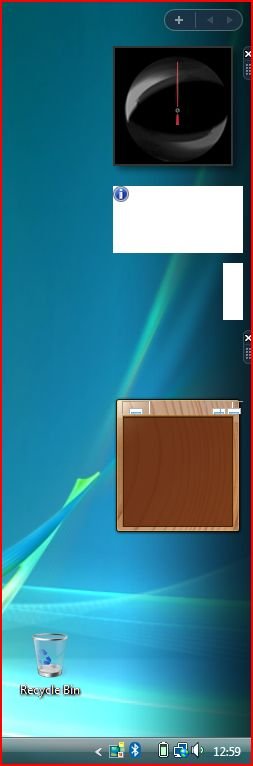
I just did a clean install of windows vista, not made too much modify to the system. gadgets were working fine before. however, when i add a gadget to the sidebar now it looks graphiccaly corrupted or straight up frozen. i looked up for potential fixes, but later found out that windows gadget platform is not even a option in the turn windows features on/off menu. does someone know how can i add it back?
 

My Computer

System One

  • Operating System
    Windows Vista Ultimate x64
I just did a clean install of windows vista...
Welcome to the forum alimeerth! We would really like to know if you have been able to activate this install of Windows Vista? That seems doubtful in light of recent articles such as Microsoft silently kills the last way to activate Windows without internet.

Microsoft actually deprecated Windows Sidebar and gadgets way back in 2012: Microsoft Security Advisory 2719662. Windows 8, 10 and 11 don’t have this old feature. I kept Windows Sidebar disabled as instructed by Microsoft. In your case, it doesn’t sound like Sidebar is disabled, but rather like you have corruption. You probably did a clean install because you were having problems with your old installation. Unless your installation media was corrupt, you most likely have an old hard drive that is failing. Assuming you do not have the so-called extended kernel, I would suggest running sfc /scannow from an elevated command prompt.
 

My Computer

System One

  • Operating System
    Vista Home Premium x86 SP2
    Manufacturer/Model
    HP Pavilion Elite m9150f
    CPU
    Intel Q6600
    Memory
    3 GB
    Graphics card(s)
    NVIDIA GeForce 8500 GT
I wonder if he has all the updates to Vista.
Also, I wonder if the screen resolution is the same as before.
I run the Windows Sidebar with no issues.
 

My Computer

System One

  • Operating System
    Vista Home Premium 64 bit SP2
    Manufacturer/Model
    Cyberpower
    CPU
    Intel Quad CPU Q6700 2.67 GHZ
    Motherboard
    NVIDIA 780i
    Memory
    4 GB
    Graphics card(s)
    MSI GTX 560 TI Twin Frozr
    Sound Card
    Sound Blaster SB Audigy
    Monitor(s) Displays
    Viewsonic VG2436
    Screen Resolution
    1920x1080p
    Hard Drives
    Samsung HD 105SI WDC WD20
    Case
    Apevia XJupiter
    Cooling
    air
    Mouse
    Logitech MX 600
    Keyboard
    Logitech MX 3200
    Internet Speed
    30 Mbps
I have the extended kernel up and working, and i installed the system to a brand new ssd. its fully updated and all the stuff, and i activated it by the developer aplication tool because there is no way to activate vista anymore in my country, turkey. at first the sidebar did not even showed up, but after using sfc /scannow, it shows up but the gadgets are glitched. screen resulution was always 1366x768, cuz suprisingly intel hd graphics driver came preinstalled in the iso.
 

My Computer

System One

  • Operating System
    Windows Vista Ultimate x64
I looked in Programs and Features and no gadgets item is listed nor is any listed in turning Windows Features on and off.

I wonder if alimeerth would provide a screenshot of the problem.
 

My Computer

System One

  • Operating System
    Vista Home Premium 64 bit SP2
    Manufacturer/Model
    Cyberpower
    CPU
    Intel Quad CPU Q6700 2.67 GHZ
    Motherboard
    NVIDIA 780i
    Memory
    4 GB
    Graphics card(s)
    MSI GTX 560 TI Twin Frozr
    Sound Card
    Sound Blaster SB Audigy
    Monitor(s) Displays
    Viewsonic VG2436
    Screen Resolution
    1920x1080p
    Hard Drives
    Samsung HD 105SI WDC WD20
    Case
    Apevia XJupiter
    Cooling
    air
    Mouse
    Logitech MX 600
    Keyboard
    Logitech MX 3200
    Internet Speed
    30 Mbps
I have the extended kernel up and working...at first the sidebar did not even showed up, but after using sfc /scannow, it shows up but the gadgets are glitched.
If you ran sfc /scannow with the so-called extended kernel installed, then your extended kernel is now bricked because those files are “corrupt” as far as sfc knows! I don’t know why you would even want extended kernel in 2026, since it is no longer sufficient for browsers such as Chrome or Firefox and not required for Supermium Web Browser. I also don’t know what effect extended kernel might have on Windows Sidebar.

@wither 3 Would you please check both your Vista and Windows 7 installations to see if “Windows gadget platform” is an option in “turn windows features on/off”? I don’t remember Vista having that, but maybe he found a post online that applied only to Windows 7? Ways of disabling Sidebar on Vista were described in the Microsoft link that I posted earlier
 

My Computer

System One

  • Operating System
    Vista Home Premium x86 SP2
    Manufacturer/Model
    HP Pavilion Elite m9150f
    CPU
    Intel Q6600
    Memory
    3 GB
    Graphics card(s)
    NVIDIA GeForce 8500 GT
I looked in Programs and Features and no gadgets item is listed nor is any listed in turning Windows Features on and off.
Would you also check Windows 7 if you still have a working installation?

I think this is an extended kernel issue that we probably won’t be able to help with. ☹️
 

My Computer

System One

  • Operating System
    Vista Home Premium x86 SP2
    Manufacturer/Model
    HP Pavilion Elite m9150f
    CPU
    Intel Q6600
    Memory
    3 GB
    Graphics card(s)
    NVIDIA GeForce 8500 GT
i just checked an vista setup on vm which has a working sidebar and it appears that the whole gadget platform option was added in windows 7, i just thought it would be the same on vista because they are almost the same os. my apologies for wasting y’all time, and for the extended kernel i dont think its bricked, cuz i can still change my build information on osver.ini amd it mimics perfectly. i’ll uninstall the ex kernel if i find a way, and update the thread if it makes a change. thanks for helping!
 

My Computer

System One

  • Operating System
    Windows Vista Ultimate x64
Vistaar- the Windows Gadget option doesn't exist in Vista. In all three of my Win 7 systems, that option exists and is check marked.

alimeerth- please provide a screen shot of the problem. I still think that this is nothing more than a resolution problem.
 
Last edited:

My Computer

System One

  • Operating System
    Vista Home Premium 64 bit SP2
    Manufacturer/Model
    Cyberpower
    CPU
    Intel Quad CPU Q6700 2.67 GHZ
    Motherboard
    NVIDIA 780i
    Memory
    4 GB
    Graphics card(s)
    MSI GTX 560 TI Twin Frozr
    Sound Card
    Sound Blaster SB Audigy
    Monitor(s) Displays
    Viewsonic VG2436
    Screen Resolution
    1920x1080p
    Hard Drives
    Samsung HD 105SI WDC WD20
    Case
    Apevia XJupiter
    Cooling
    air
    Mouse
    Logitech MX 600
    Keyboard
    Logitech MX 3200
    Internet Speed
    30 Mbps
Thanks.
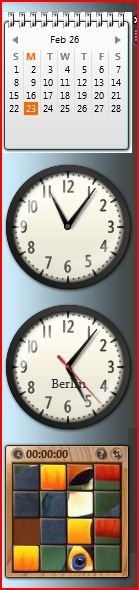
I don't have the top and bottom gadgets. Did you add these from an online source? If those two aren't displayed properly, please explain the differences from what they should be.
What are the two blank ones and the one with x supposed to be?
 

My Computer

System One

  • Operating System
    Vista Home Premium 64 bit SP2
    Manufacturer/Model
    Cyberpower
    CPU
    Intel Quad CPU Q6700 2.67 GHZ
    Motherboard
    NVIDIA 780i
    Memory
    4 GB
    Graphics card(s)
    MSI GTX 560 TI Twin Frozr
    Sound Card
    Sound Blaster SB Audigy
    Monitor(s) Displays
    Viewsonic VG2436
    Screen Resolution
    1920x1080p
    Hard Drives
    Samsung HD 105SI WDC WD20
    Case
    Apevia XJupiter
    Cooling
    air
    Mouse
    Logitech MX 600
    Keyboard
    Logitech MX 3200
    Internet Speed
    30 Mbps
If you notice on the right side of the icons there's an X and then another icon. You're missing the icon which changes the look of the gadget. Not sure what's going on.

Right click in the border on the right side of the clock and select the second icon down. Do you have a standard round clock in the display options? I don't have an option to display the face that you have?

I'm unable to change the look of the calendar. Mine just looks like a standard calendar page for a given month.

The weather is no longer available because, apparently, the link to the Microsoft weather page available when Vista came out, no longer exists.

I don't know what's going on with your puzzle gadget.

Below is what my side bar looks like for the gadgets you mention except for the weather.

I wonder if you would provide a screen shot of the available gadgets when you press on + at the top of the sidebar.
 

Attachments

  • Vistagadgetssidebar.JPG
    Vistagadgetssidebar.JPG
    24.9 KB · Views: 2

My Computer

System One

  • Operating System
    Vista Home Premium 64 bit SP2
    Manufacturer/Model
    Cyberpower
    CPU
    Intel Quad CPU Q6700 2.67 GHZ
    Motherboard
    NVIDIA 780i
    Memory
    4 GB
    Graphics card(s)
    MSI GTX 560 TI Twin Frozr
    Sound Card
    Sound Blaster SB Audigy
    Monitor(s) Displays
    Viewsonic VG2436
    Screen Resolution
    1920x1080p
    Hard Drives
    Samsung HD 105SI WDC WD20
    Case
    Apevia XJupiter
    Cooling
    air
    Mouse
    Logitech MX 600
    Keyboard
    Logitech MX 3200
    Internet Speed
    30 Mbps
...Do you have a standard round clock in the display options? I don't have an option to display the face that you have?
I can’t imagine why there would be an option like his screen shot. The only recognizable feature is the red second hand, which wasn’t present by default, so he has probably tried various options for the clock. I’m curious if the second hand is frozen or if it rotates? As I recall, a gadget could be restored to default simply by removing it from the Sidebar, then putting it back.

The absence of the color white makes me wonder if he is using an unusual theme? (Right-click on the desktop and select Personalize.) If he’s using Aero, then Windows Classic might be worth a try.

I also wonder what the gadgets look like in Safe Mode? If they’re normal there, then the issue must be related to the Intel HD graphics driver that was included with the custom ISO he used to install Vista.

OT: Why does an American need a Berlin clock on his Sidebar? 🤔
 

My Computer

System One

  • Operating System
    Vista Home Premium x86 SP2
    Manufacturer/Model
    HP Pavilion Elite m9150f
    CPU
    Intel Q6600
    Memory
    3 GB
    Graphics card(s)
    NVIDIA GeForce 8500 GT
Back
Top