
I have Windows Home Vista SP2
Today I received notification of Windows Updates that were ready to install; so I installed them. It seemed to take forever.
I came to check on progress and the screen said that the updates were not configured correctly, changes were being reverted and I should NOT shut off my computer. It took quite a long time before my system was once again restarted.
I opened Windows Updates and it showed there were no updates for my computer. I clicked to view the installed updates and most of those in the list show as "Failed." See screenshot.
I clicked "Windows Updates" again to see if it would pick up anything. It's still running.
I hope someone can tell me what's going on here. Should I Google these "Failed" updates and try to install them again?
Windows Updates is still running and that doesn't seem right either because it's just taking too long. Think I will go ahead and post this. If I get anything out of the Windows Updates run I will come back and advise.
The screenshot I attached showed until I clicked to submit. Now it's now showing. I'm going to try and attach again.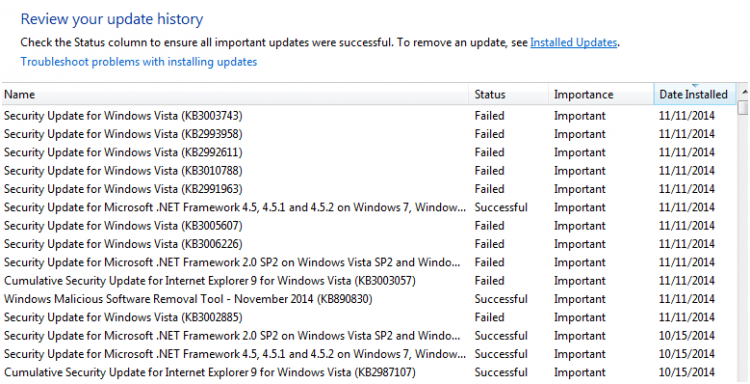
Today I received notification of Windows Updates that were ready to install; so I installed them. It seemed to take forever.
I came to check on progress and the screen said that the updates were not configured correctly, changes were being reverted and I should NOT shut off my computer. It took quite a long time before my system was once again restarted.
I opened Windows Updates and it showed there were no updates for my computer. I clicked to view the installed updates and most of those in the list show as "Failed." See screenshot.
I clicked "Windows Updates" again to see if it would pick up anything. It's still running.
I hope someone can tell me what's going on here. Should I Google these "Failed" updates and try to install them again?
Windows Updates is still running and that doesn't seem right either because it's just taking too long. Think I will go ahead and post this. If I get anything out of the Windows Updates run I will come back and advise.
The screenshot I attached showed until I clicked to submit. Now it's now showing. I'm going to try and attach again.
Last edited:
My Computer
System One
-
- Manufacturer/Model
- Dell DXP061
- CPU
- 1.87 gigahertz Intel Core 2 Duo
- Memory
- 4 GB
- Sound Card
- High Definition Audio Device
- Monitor(s) Displays
- NVIDIA GeForce 7300 LE DELL E207WFP [Monitor] 20"
- Screen Resolution
- 1280x800
- Hard Drives
- SAMSUNG HD321KJ [Hard drive] (320.07 GB)
- Internet Speed
- DSL
- Other Info
- Avast Internet Security 7 / Malwarebytes Pro / WinPatrol Plus / Secunit PSI /
