Windows Vista Forums
Vista Forums Home Join Vista Forums Windows 7 Forum Vista Tutorials Tags
Welcome to Windows Vista Forums. Our forum is dedicated to helping you find solutions with any problems, errors or issues you are experiencing with Windows Vista. The Vista forum also covers news and updates and has an extensive Windows Vista tutorial section that covers a wide range of tips and tricks.


Go Back   Vista Forums > Vista Forums > Network & Sharing

RB

Vista - Vista Network Speed Slows over time

Reply
 
10-06-2009   #1


Vista Home Premium 32bit


Vista Network Speed Slows over time

I asked for help with this problem once before and did not get a fix --- so I am trying again ...

Problem is network bandwidth as measured by the speed test(s) will decrease over time without any changes being made -- it does not matter what time of day either.

It is a Vista PC running SP2 and hard wired to a Linksys router ( Wireless-G model ) and I am a Comcast customer with 30mbps service. Maybe I should mention this PC sits idle for most of the day before the family comes home from school. All of the XP systems in the house do NOT have this problem.
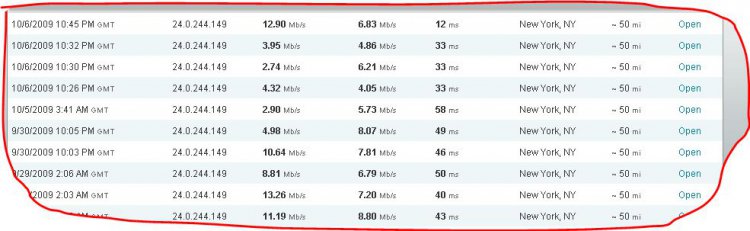
speed.jpg

As you can see over the course of 5 days the download speed drops into the 2-3 mbps range ( and the upload speeds are greater than the download speeds !! )

The 12mbps measurement was taken after the reboot.

The only fix I have found is rebooting the machine --- then performance is as expected for a day or so before it starts to drop again.

Any and all suggestions welcome ( short of upgrading to Windows 7 --- )

My System SpecsSystem Spec
10-06-2009   #2


Vista 32 win 7 7600 32 bit


Re: Vista Network Speed Slows over time

94P

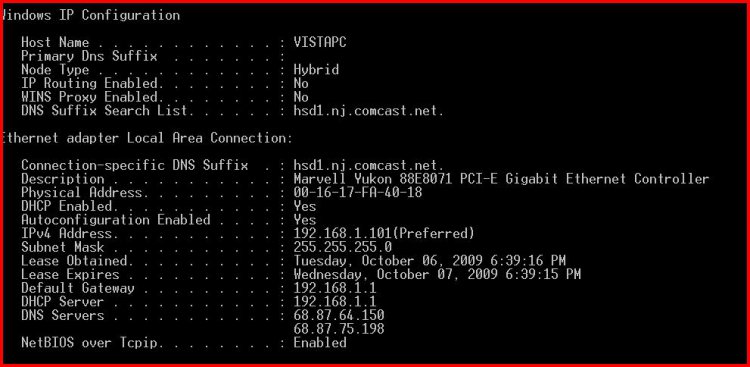
can you do me a favor go to start>search>type cmd> rype ipconfig /all and use the built in snipping tool (type snipping in search) to make a screenshot and upload it to us

thanks

ken
My System SpecsSystem Spec
10-06-2009   #3


Ubuntu 9.10 64 Bit


Re: Vista Network Speed Slows over time

Are you getting any network activity while the machine is a idle? ie led's blinking really fast.
My System SpecsSystem Spec
10-06-2009   #4


Vista Home Premium 32bit


Re: Vista Network Speed Slows over time

Quote  Quote: Originally Posted by CrucialHoax View Post
Are you getting any network activity while the machine is a idle? ie led's blinking really fast.
The only LEDs blinking on on the router -- I suspect there is failry constant "handshaking" going on with the home network / router causing this (?)
My System SpecsSystem Spec
10-06-2009   #5


Ubuntu 9.10 64 Bit


Re: Vista Network Speed Slows over time

Quote  Quote: Originally Posted by 94porkr View Post
Quote  Quote: Originally Posted by CrucialHoax View Post
Are you getting any network activity while the machine is a idle? ie led's blinking really fast.
The only LEDs blinking on on the router -- I suspect there is failry constant "handshaking" going on with the home network / router causing this (?)
Okay. Hmm. Does the vista machine have a firewall or a bandwidth consuming program running?
My System SpecsSystem Spec
10-06-2009   #6


Vista Home Premium 32bit


Re: Vista Network Speed Slows over time

Quote  Quote: Originally Posted by zigzag3143 View Post
94P

can you do me a favor go to start>search>type cmd> rype ipconfig /all and use the built in snipping tool (type snipping in search) to make a screenshot and upload it to us

thanks

ken
ipconfig.jpg

Let me know if you need the NETSH type displays as well -- and thank you for the help
My System SpecsSystem Spec
10-06-2009   #7


Vista Home Premium 32bit


Re: Vista Network Speed Slows over time

Quote  Quote: Originally Posted by CrucialHoax View Post
Quote  Quote: Originally Posted by 94porkr View Post
Quote  Quote: Originally Posted by CrucialHoax View Post
Are you getting any network activity while the machine is a idle? ie led's blinking really fast.
The only LEDs blinking on on the router -- I suspect there is failry constant "handshaking" going on with the home network / router causing this (?)
Okay. Hmm. Does the vista machine have a firewall or a bandwidth consuming program running?
I am using ZoneAlarm as the firewall ...
My System SpecsSystem Spec
10-06-2009   #8


Ubuntu 9.10 64 Bit


Re: Vista Network Speed Slows over time

Have you updated the network interface driver? Maybe that's the root cause. Whats the pc manufacturer and model number of the pc? ie HP Pavilion dv4
My System SpecsSystem Spec
10-07-2009   #9


Vista Home Premium 32bit


Re: Vista Network Speed Slows over time

Quote  Quote: Originally Posted by CrucialHoax View Post
Have you updated the network interface driver? Maybe that's the root cause. Whats the pc manufacturer and model number of the pc? ie HP Pavilion dv4
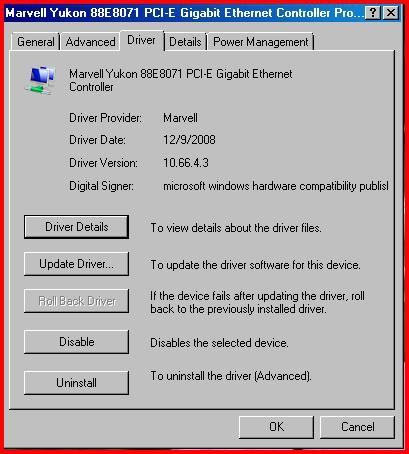
Yes -- Marvell Yukon that came with my Lenovo 9120-CTO -- this was one of the first things I tried. Somebody mentioned looking for programs that consume bandwidth -- any idea what these might be ? I havethe same things running on XP with the exception of Windows Live Messenger, Zone Alarm, and maybe one other.
marvell.jpg
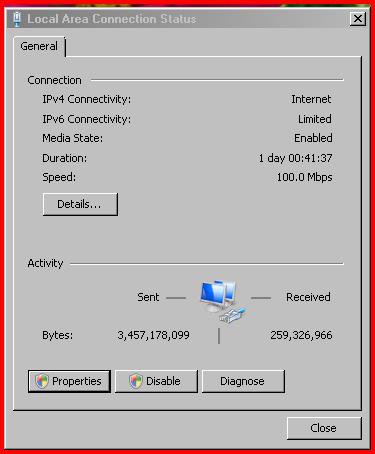
lan-connection-status.jpg

BTW -- I hae also tried the netsh commands I found posted on the web for the TCPIP stack issues w/o any results either.

Thanks again for trying to help -- I have been dealing with this for 1 year +
My System SpecsSystem Spec
10-07-2009   #10


Ubuntu 9.10 64 Bit


Re: Vista Network Speed Slows over time

Bandwidth consuming programs like uTorrent, frostwire, or any other P2P software. Try re-enabling the vista firewall and see if that changes the results
My System SpecsSystem Spec
Reply

RB


Thread Tools


Similar Threads for: Vista Network Speed Slows over time
Thread Forum
How to speed up Vista boot time? General Discussion
antiphishing slows down page load time Network & Sharing
Clock Speed Slows Down Vista General
Network slows down every 60 seconds Vista networking & sharing
Why Vista slows down over time Vista performance & maintenance


Vista Forums is an independent web site and has not been authorized,
sponsored, or otherwise approved by Microsoft Corporation.
"Windows Vista", the Start Orb, and related materials are trademarks of Microsoft Corp.
© Designer Media Ltd