![]() |
![]() | ![]() | ![]() | ![]() | ![]() | ![]() | ![]() |
| Welcome to Windows Vista Forums. Our forum is dedicated to helping you find solutions with any problems, errors or issues you are experiencing with Windows Vista. The Vista forum also covers news and updates and has an extensive Windows Vista tutorial section that covers a wide range of tips and tricks. |
| |||||||
![]() |
| |
| | #1 (permalink) |
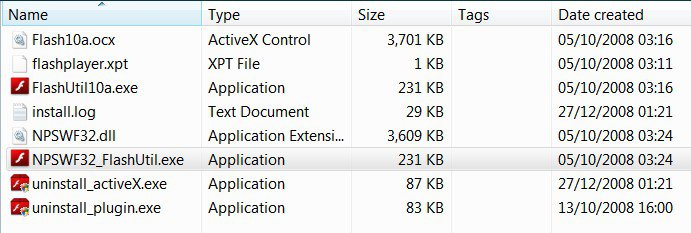
| Windows 7 RTM 64-bit | Flash player for vista(64) bit 1. Open Computer. 2. Navigate to C:\Windows\SysWOW64\. 3. Scroll down and open the Macromed directory. 4. Open the Flash directory. 5. Right-click FlashUtil9b. 6. Select Run as Administrator. 7. When the UAC prompt appears, select Continue. 8. Follow the Flash Player installation wizard. Once the wizard completes, Flash Player has been properly installed and will now function properly. ![]() I have tried this on a Dell Vista system and it worked like a charm. Please try it onto your machines and please let me know if it works. |
My System Specs![]() |
| | #2 (permalink) |
| Win7 x64 Ultimate|Vista Ultimate x64 SP2 | Re: Flash player for vista(64) bit Many THX for this. I would like to see more of these posts. Posts that enable us to harness the power of 64 bit. I only recently found out that we also have a 64bit version of Media Player, and believe me the sound difference is amazing and the sample rate and bit depth are greatly improved. |
My System Specs![]() |
| | #3 (permalink) |
| Windows 7 RTM 64-bit | Re: Flash player for vista(64) bit Your Welcome Bellerophon. |
My System Specs![]() |
| | #4 (permalink) |
| Vista Ultimate SP2 x64 : Seven Ultimate x64 | Re: Flash player for vista(64) bit Don't have the file. It may be a pre-installed OEM app. Worth a look anyway |
My System Specs![]() |
| | #5 (permalink) |
| Vista Ultimatex64 Windows 7 build 7100 | Re: Flash player for vista(64) bit 1. Open Computer. 2. Navigate to C:\Windows\SysWOW64\. 3. Scroll down and open the Macromed directory. 4. Open the Flash directory. 5. Right-click FlashUtil9b. 6. Select Run as Administrator. 7. When the UAC prompt appears, select Continue. 8. Follow the Flash Player installation wizard. Once the wizard completes, Flash Player has been properly installed and will now function properly. ![]() I have tried this on a Dell Vista system and it worked like a charm. Please try it onto your machines and please let me know if it works. ![]() Sort of expected it ![]() ![]() ![]() Pooch |
My System Specs![]() |
| | #6 (permalink) |
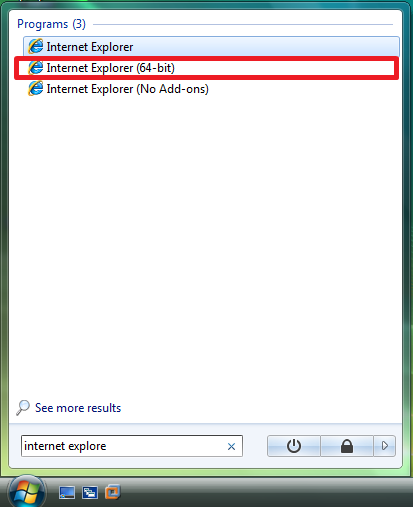
| Vista Ultimate x64 SP1 | Re: Flash player for vista(64) bit "Flash player for vista(64) bit" - This title is somewhat confusing and misleading. You "can" use Flash Player on Vista 64, "IF" you use Vista 64's 32-bit version of Internet Explorer. To use Vista 64's IE32, go to "Program Files (x86)", "Internet Explorer", look for "iexplore.exe", from there you can create a shortcut on your desktop or link it to your keyboard like I do. And no, you can't play flash files on Internet Explorer 64 because Flash is not 64-bit compatible. And yes, I tried the method posted by dinesh. And If you "do" have flash playing in IE, then check the version of IE by going to "help", "About Internet Explorer" and see if it states it's the 64-bit version? |
My System Specs![]() |
| | #7 (permalink) |
| Windows 7 RTM 64-bit | Re: Flash player for vista(64) bit "Flash player for vista(64) bit" - This title is somewhat confusing and misleading. You "can" use Flash Player on Vista 64, "IF" you use Vista 64's 32-bit version of Internet Explorer. To use Vista 64's IE32, go to "Program Files (x86)", "Internet Explorer", look for "iexplore.exe", from there you can create a shortcut on your desktop or link it to your keyboard like I do. And no, you can't play flash files on Internet Explorer 64 because Flash is not 64-bit compatible. And yes, I tried the method posted by dinesh. And If you "do" have flash playing in IE, then check the version of IE by going to "help", "About Internet Explorer" and see if it states it's the 64-bit version? Did it work for you? |
My System Specs![]() |
| | #8 (permalink) |
| Vista Ultimate x64 SP1 | Re: Flash player for vista(64) bit "Flash player for vista(64) bit" - This title is somewhat confusing and misleading. You "can" use Flash Player on Vista 64, "IF" you use Vista 64's 32-bit version of Internet Explorer. To use Vista 64's IE32, go to "Program Files (x86)", "Internet Explorer", look for "iexplore.exe", from there you can create a shortcut on your desktop or link it to your keyboard like I do. And no, you can't play flash files on Internet Explorer 64 because Flash is not 64-bit compatible. And yes, I tried the method posted by dinesh. And If you "do" have flash playing in IE, then check the version of IE by going to "help", "About Internet Explorer" and see if it states it's the 64-bit version? Did it work for you? |
My System Specs![]() |
| | #9 (permalink) |
| Windows 7 RC x64 (7100) | Re: Flash player for vista(64) bit Could you post the information about the browser used on your testing, and also the architecture reported by the taskmanager please. Since it was installed on SysWOW64 I assume it's a 32bit binary and it wouldn't load on 64bit browsers. Many THX for this. I would like to see more of these posts. Posts that enable us to harness the power of 64 bit. I only recently found out that we also have a 64bit version of Media Player, and believe me the sound difference is amazing and the sample rate and bit depth are greatly improved. |
My System Specs![]() |
| | #10 (permalink) |
| VISTA HOME PREMIUM X64/ 7 x64 / 7x86 | Re: Flash player for vista(64) bit |
My System Specs![]() |
![]() |
| Thread Tools | |
| |
Similar Threads | ||||
| Thread | Forum | |||
| Adobe Flash Player 10 and Vista | Vista installation & setup | |||
| Vista and adobe flash player | Vista performance & maintenance | |||
| Flash Player won't install on Vista 32 | Vista music pictures video | |||
| Flash Player IE7 Vista | Vista General | |||
| Vista Ultimate RTM and Flash player!!!! | Vista General | |||