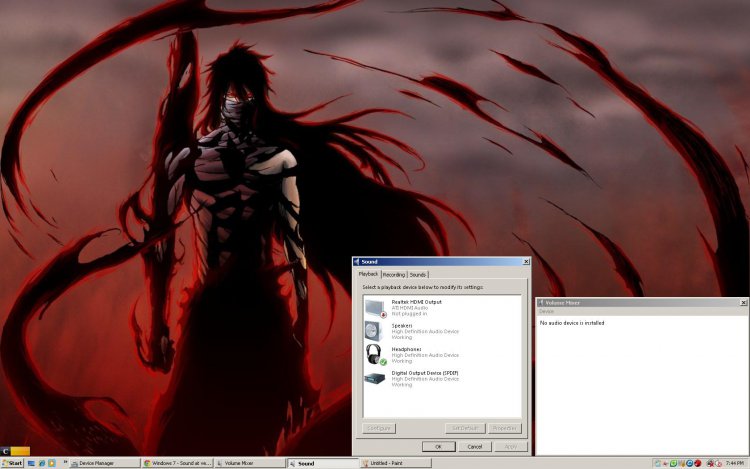
I just have the normal light green plug-in and my hdmi to connect my graphics cards.
I think the main problem is the ATI because when ever i try to install the updates the display and audio get a "INF. cannot be found" error.
Are you saying that you have only one speaker connected?
There are six audio ports. I would try plugging into the gray, black or yellow and see if it makes any difference.
You do have the Realtek chipset. I think you should try switching the driver from the Radeon to the Realtek and then try doing the configure.
I dont really know how to switch radeon to realket.


Can you do this : Repair Install For Vista and just get what ever is messed up repaired ?
I dont have any vista installation cd.
You didnt tell me how many speakers you have.
Did you try the other ports? If so, did the Realtek software ask you if you installed a speaker whenever you plugged into a port?
Go to Control Panel, Device manager, Sound, etc. Is the Realtek High Definition Audio listed? If it it, right click on it and scan for hardware changes.
I only have the built in speakers. I hit the check for any changes on realtek and nothing happens.
Try your headphones in the other ports I mentioned.
Was Realtek listed under Sound in Device Manager?
I have.
| Similar Threads | ||||
| Thread | Thread Starter | Forum | Replies | Last Post |
| How do i get 2 channel sound to have different sound thru headphones & speakers? | biffyman | Sound & Audio | 2 | 16 May 2010 |
| Internal Sound is working but no sound for headphones | =?Utf-8?B?UGllcnJlRGE=?= | Vista installation & setup | 5 | 29 May 2008 |
| Internal sound is woring but no way to use headphones (no sound) | =?Utf-8?B?UGllcnJlRGE=?= | Vista installation & setup | 0 | 04 Sep 2006 |
| Internal Sound is working but no sound for headphones | =?Utf-8?B?UGllcnJlRGE=?= | Vista installation & setup | 0 | 04 Sep 2006 |
| Internal Sound is working but no sound for headphones | =?Utf-8?B?UGllcnJlRGE=?= | Vista installation & setup | 0 | 04 Sep 2006 |