
How to Add Flip 3D to the Desktop Context Menu in Vista and Windows 7
 Information
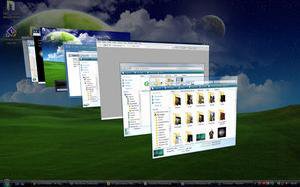
This will show you how to add Flip 3D, also known as Switch between windows or Window Switcher, to the Desktop right click context menu in Vista.
 Note
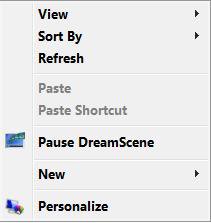
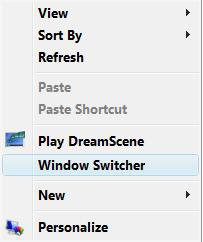
NoteWith this, you can now right click on the desktop, or in Windows Explorer window, and click on Windows Switcher to open and use Flip 3D.
Keyboard Shortcut Keys for Flip 3D
NOTE: Press the key combinations below in blue to activate.
Keyboard Shortcut Keys for Flip 3D
NOTE: Press the key combinations below in blue to activate.
- Windows Key + Tab = Press and hold Windows Key, then press Tab (or roll mouse scroll wheel) to scroll through the open windows. Choose the open window you want by releasing the Windows Key when the window is at the front.
- Ctrl + Windows Key + Tab = Scroll through the open windows by pressing the Tab key, arrow keys, or roll the mouse scroll wheel. Click on the window you want to see, or press Enter when it is up front.
 Warning
HARDWARE REQUIREMENTS FOR: WINDOWS AERO
See: Windows Help and Support: Troubleshoot problems with Windows Aero
NOTE: The Windows Aero color scheme is not available for the Vista Home Basic or Windows 7 Home Starter editions.

- 1 GHz 32-bit or 64-bit processor
- 1 GB of system memory
- A graphics card with support for DirectX 9 graphics with at least 128 MB of memory.
- The graphics card must support Pixel Shader 2.0 and the Windows Display Driver Model (WDDM).
- You must be have True Color (32 bit) set instead of High Color (16 bit).
- The Desktop Window Manager Session Manager and Themes Services need to be set as Started and Automatic.
- Refresh or update your WEI score.
- The Windows Aero color scheme selected and turned on.
- The Enable desktop composition and Animate controls and elements inside windows options enabled in Visual Effects.
- Using a Aero theme.
EXAMPLE: Flip 3D
EXAMPLE: Context Menu Before and After Flip 3D is AddedNOTE: It will have the name Windows Switcher in the context menu for Flip 3D. This is for when you right click on the desktop or in Windows Explorer.
 METHOD ONE
1. To Add Flip 3D to the Context Menu
A) Click on the download button below to download the file below.
Add_Window_Switcher.reg

B) Go to step 3.
2. To Remove Flip 3D from the Context Menu
NOTE: This is the default setting.
A) Click on the download button below to download the file below.
Remove_Window_Switcher.reg
3. Click on Save, and save the .reg file to the Desktop.
4. Right click on the downloaded .reg file and click on Merge.
5. Click on Run, Continue (UAC-Vista) or Yes (UAC-Windows 7), Yes, and then OK when prompted.
6. When done, you can delete the .reg file (on Desktop).
METHOD TWO 1. Open the Start Menu, then type regedit in the search boxand press Enter.
2. If prompted by UCA, then click on Continue (Vista) or Yes (Windows 7).
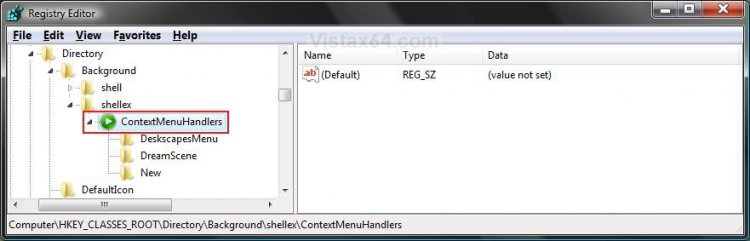
3. In regedit, navigate to the location below. (see screenshot below step 4A)
HKEY_CLASSES_ROOT\Directory\Background\shellx\ContextMenuHandlers
4. To Add Flip 3D to the Context Menu
A) In the left pane, right click on ContextMenuHandlers and click on New, then on Key. (see screenshot below)
B) Type Windows Switcher and press Enter. (see screenshot below step 4C)
C) In the right pane, right click on (Default) and click on Modify. (see screenshot below)
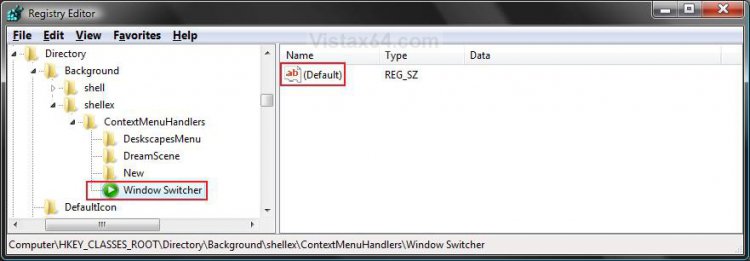
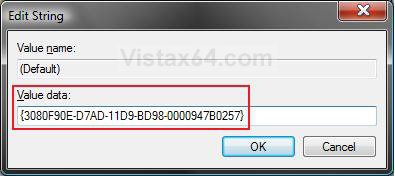
D) Type {3080F90E-D7AD-11D9-BD98-0000947B0257} and click on OK. (see screenshot below)
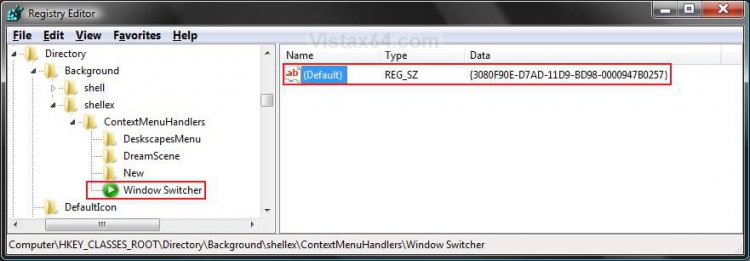
E) The registry will now look like this. (see screenshot below)
F) Go to step 6.
5. To Remove Flip 3D from the Context Menu
NOTE: This is the default setting.
A) In the left pane, right click on Windows Switcher and click on Delete. (see screenshot above)
B) Click on Yes to confirm the deletion.
6. Close regedit.
That's it,Shawn
Related Tutorials
- How to Expand the Context (Shortcuts) Menu in Vista
- How to Customize the Context Menu for the Start Menu in Vista
- How to Customize the Send To Context Menu in Vista
- How to Customize the Recycle Bin Context Menu in Vista
- How to Add Encrypt and Decrypt to the Context Menu in Vista
- How to Add and Remove a New Menu Item in Vista
- How to Add COPY TO FOLDER and MOVE TO FOLDER to the Context Menu in Vista
- How to Restore the Search Context Menu Item after Installing the Vista SP1
- How to Use and Create a Flip 3D Shortcut in Vista
- How to Enable or Disable Flip 3D in Vista
- How to Restore or Remove New from the Context Menu in Vista
- How to Enable or Disable the Context Menu in Vista
- How to Remove or Show Drives in the Vista and Windows 7 "Send To" Context Menu
- How to Add View and Print File Directory to the Context Menu in Vista
- How to Add or Remove Copy as Path from the Vista Context Menu
- How to Add or Remove Send To from the Vista Context Menu
- How to Add or Remove Turn Aero On or Off from the Vista Context Menu
- How to Add System Properties to Computer Context Menu in Vista
- How to Restore or Remove "Restore Previous Versions" from the Vista Context Menu
- How to Change the Color Bit Depth Settings in Vista
- How to Add Empty Folder and Subfolders to the Vista Context Menu
Attachments
Last edited:


