Vista Forums
Vista Forums Home Join Vista Forums Donate Vista Tutorials Store Tags

Welcome to Vista Forums we are your forum to discuss Windows Vista x64 and x86 systems.

Go Back   Vista Forums > Vista Forums > Tutorials

User Account Control (UAC) - Elevate Privilege Level

Poll: Did this Tutorial help and work for you?
Poll Options
Did this Tutorial help and work for you?

Comment
 
Tutorial Tools Display Modes
<!-- google_ad_section_start -->User Account Control (UAC) - Elevate Privilege Level<!-- google_ad_section_end -->
User Account Control (UAC) - Elevate Privilege Level
How to Elevate Administrators UAC Privilege Level in Vista
Published by Brink
06-09-2007

How to Elevate Administrators UAC Privilege Level in Vista

Information
  This will show you how to elevate the administrator UAC Privilege Level to keep UAC on, but stop the annoying UAC elevation prompts for all administrator accounts. UAC will still be on and work as usuall for the Standard and Guests account types. For more information, see:
NOTE
  This will still leave Protected Mode: ON in Internet Explorer to.
WARNING
  This can only be done while logged on to an administrator account.
RELATED LINKS:


METHOD ONE:
Through Local Security Policy
NOTE
  This method is only available for the Vista Business, Ultimate, and Enterprise editions. See Method Two below for the Vista Home Basic and Home Premium editions.
1. Open the Start Menu.
2. In the white line (Start Search) area, type secpol.msc and press Enter.
3. In the left pane, click on Local Policies. (See screenshot below)
4. Click on Security Options.
5. In the right pane, double click on User Account Control: Behavior of the elevation prompt for administrators in Admin Approval Mode.
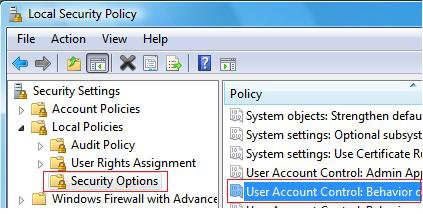
Policy.jpg

6. To Elevate Administrators for no Prompting by UAC -
NOTE: When you elevate the administrator accounts privilege level, the Security Center will give you an alert warning notification in the notification area of the taskbar until you undo this. To turn this alert off, see: How to Disable or Enable the Security Center Alert Warning Notification in Vista
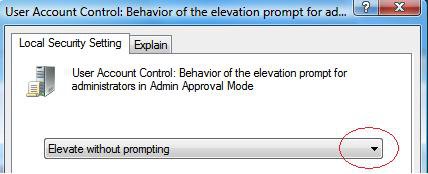
A) Click on the drop down arrow and change the setting to Elevate without prompting. (See screenshot below step 9)
B) Go to step 9.
7. To Have UAC Prompt Administrators for a Password -
NOTE: This will act just like it does in a Standard account by UAC asking you for the administrator password before continuing.
A) Click on the drop down arrow and change the setting to Prompt for credentials. (See screenshot below step 9)
B) Go to step 9.
8. To Have UAC Prompt Administrators for a Continue -
NOTE: This is the default setting for UAC asking the administrator to click on Continue to give permission.
A) Click on the drop down arrow and change the setting to Prompt for consent. (See screenshot below step 9)
9. Click OK to apply.

UAC.jpg

10. Close the Local Security Policy window. Your Done.


METHOD TWO:
Through the Registry
NOTE
  This method will work for all Vista versions.
Through a Download:
1. To Elevate Administrator Privilege -
NOTE: When you elevate the administrator accounts privilege level, the Security Center will give you an alert warning notification in the notification area of the taskbar until you undo this. To turn this alert off, see: How to Disable or Enable the Security Center Alert Warning Notification in Vista
A) Click on the download button below to download the Elevate_Administrator_Priviledge.reg file.
B) Go to step 3.


2. To Restore Default Settings -
A) Click on the download button below to download the Restore_Default_Settings.reg file.


3. Click on Save, and save the .reg file to the Desktop.
4. Right click the .reg (On Desktop) file and click Merge.
5. Click on the Run button for Security Warning pop-up.
6. Click on Continue (UAC), Yes, and then OK when prompted.
7. Logoff and logon, or restart the computer to apply the changes.
8. When done, you can delete the .reg file (On Desktop).


The Manual Way:
1. Open the Start Menu.
2. In the white line (Start Search) area, type regedit and press Enter.
3. Click Continue button for UAC prompt.
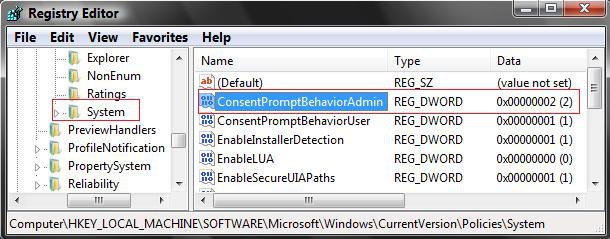
4. In regedit, go to: (See screenshot below)
HKEY_LOCAL_MACHINE\SOFTWARE\Microsoft\Windows\CurrentVersion\Policies\System
5. In the right pane, right click on ConsentPromptBehaviorAdmin and click Modify.

REG.jpg

6. To Elevate Administrator Privilege Level -
NOTE: When you elevate the administrator accounts privilege level, the Security Center will give you an alert warning notification in the notification area of the taskbar until you undo this. To turn this alert off, see: How to Disable or Enable the Security Center Alert Warning Notification in Vista
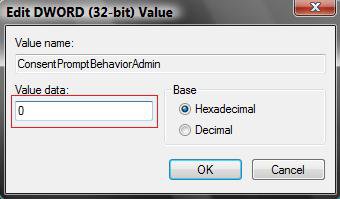
A) Type 0 (Number) and click OK. (See screenshot below)
7. To Restore Default Settings -
A) Type 2 and click OK.
Modify.jpg

8. Close regedit.
9. Logoff and logon, or restart the computer to apply the changes.
That's it,
Shawn
Published by
Brink's Avatar
Administrator
Join Date: Apr 2007
Location: Texas, USA
Posts: 13,545
Rep Power: 200
Brink has a reputation beyond reputeBrink has a reputation beyond reputeBrink has a reputation beyond reputeBrink has a reputation beyond reputeBrink has a reputation beyond reputeBrink has a reputation beyond reputeBrink has a reputation beyond reputeBrink has a reputation beyond reputeBrink has a reputation beyond reputeBrink has a reputation beyond reputeBrink has a reputation beyond repute

Tutorial Tools

Applies to
All Vista Versions
64 Bit & 32 Bit

Rating
Skill Level
20%20%20%
1

Page copy protected against web site content infringement by Copyscape

Old 12-16-2007  
pRose_DC
www.danielcosentino.com
pRose_DC is on a distinguished road
 
Join Date: Dec 2007
Vista Home Premium 32bit
Posts: 2

Re: User Account Control (UAC) - Elevate Privilege Level

I use Vista Home Premium and successfully followed method 2 above. That method seems to turn off the UAC. But what I'd like to do is avoid the prompt for certain programs such as yahoo messenger and adobe suites and leave the UAC on for everything else. Is this possible?
pRose_DC is offline   Reply With Quote
Old 12-16-2007  
Brink
Administrator
Brink has a reputation beyond reputeBrink has a reputation beyond reputeBrink has a reputation beyond reputeBrink has a reputation beyond reputeBrink has a reputation beyond reputeBrink has a reputation beyond reputeBrink has a reputation beyond reputeBrink has a reputation beyond reputeBrink has a reputation beyond reputeBrink has a reputation beyond reputeBrink has a reputation beyond repute
 
Brink's Avatar
 
Join Date: Apr 2007
Vista x64 Ultimate SP1
Posts: 13,545

Location: Texas, USA
Re: User Account Control (UAC) - Elevate Privilege Level

Hi pRose DC,

It would be nice to have exceptions for programs in UAC like in a firewall program., but that is not an option in Vista. It's all or none.

Sorry,
Shawn

There are no dumb questions, just the people that do not ask them.
Please post feedback to help others.
Brink is offline   Reply With Quote
Old 01-03-2008  
TrevB
Newbie
TrevB is on a distinguished road
 
Join Date: Jan 2008
Vista Home Premium 32bit
Posts: 2

Re: User Account Control (UAC) - Elevate Privilege Level

Hi

I am trying to install Symantec Antivirus software under Vista Home Premium and get the following error message:

This version of Symantec AntiVirus requires elevated privileges in order to install.

I have tried the download and manual options described in:

How to Elevate Administrators UAC Privilege Level in Vista

but still cannot install Symantec.

Any ideas?
TrevB is offline   Reply With Quote
Old 01-03-2008  
Brink
Administrator
Brink has a reputation beyond reputeBrink has a reputation beyond reputeBrink has a reputation beyond reputeBrink has a reputation beyond reputeBrink has a reputation beyond reputeBrink has a reputation beyond reputeBrink has a reputation beyond reputeBrink has a reputation beyond reputeBrink has a reputation beyond reputeBrink has a reputation beyond reputeBrink has a reputation beyond repute
 
Brink's Avatar
 
Join Date: Apr 2007
Vista x64 Ultimate SP1
Posts: 13,545

Location: Texas, USA
Re: User Account Control (UAC) - Elevate Privilege Level

Hi TrevB,

Welcome to Vista Forums.

I hate to say this, but I would avoid installing any Symantec Norton antivirus program on Vista until they can fix the problem. There has been so many reported problems with Norton and Vista it isn't even funny anymore. I would recommend using something like the free Avast antivirus instead. It may have just saved you a headache later by not installing.

http://www.avast.com/eng/avast_4_home.html

Shawn

There are no dumb questions, just the people that do not ask them.
Please post feedback to help others.
Brink is offline   Reply With Quote
Old 01-08-2008  
TrevB
Newbie
TrevB is on a distinguished road
 
Join Date: Jan 2008
Vista Home Premium 32bit
Posts: 2

Re: User Account Control (UAC) - Elevate Privilege Level

Thanks for the advice. I have downloaded and installed Avast without incident.

Thanks again.

TrevB

Quote:
brink
View Post
Hi TrevB,

Welcome to Vista Forums.

I hate to say this, but I would avoid installing any Symantec Norton antivirus program on Vista. There has been so many reported problems with Norton and Vista it isn't even funny anymore. I would recommend using something like the free Avast antivirus instead. It may have just saved you a headache later by not installing.

http://www.avast.com/eng/avast_4_home.html

Shawn
TrevB is offline   Reply With Quote
Old 01-08-2008  
Brink
Administrator
Brink has a reputation beyond reputeBrink has a reputation beyond reputeBrink has a reputation beyond reputeBrink has a reputation beyond reputeBrink has a reputation beyond reputeBrink has a reputation beyond reputeBrink has a reputation beyond reputeBrink has a reputation beyond reputeBrink has a reputation beyond reputeBrink has a reputation beyond reputeBrink has a reputation beyond repute
 
Brink's Avatar
 
Join Date: Apr 2007
Vista x64 Ultimate SP1
Posts: 13,545

Location: Texas, USA
Re: User Account Control (UAC) - Elevate Privilege Level

Your welcome TrevB.

Glad to hear it went well. Thank you for the feedback.

Shawn

There are no dumb questions, just the people that do not ask them.
Please post feedback to help others.
Brink is offline   Reply With Quote
Old 01-22-2008  
Killerchronic
Linux <3
Killerchronic is on a distinguished road
 
Join Date: Jan 2008
Ultimate x64
Posts: 5

Re: User Account Control (UAC) - Elevate Privilege Level

Thanks for this info, before i just turned it off but this seems a better way.
Killerchronic is offline   Reply With Quote
Old 02-01-2008  
beauparc
Junior Member
beauparc is on a distinguished road
 
Join Date: Jan 2008
Home premium 32
Posts: 25

Re: User Account Control (UAC) - Elevate Privilege Level

Thanks for another brilliant tip Brink
beauparc is offline   Reply With Quote
Old 02-01-2008  
Brink
Administrator
Brink has a reputation beyond reputeBrink has a reputation beyond reputeBrink has a reputation beyond reputeBrink has a reputation beyond reputeBrink has a reputation beyond reputeBrink has a reputation beyond reputeBrink has a reputation beyond reputeBrink has a reputation beyond reputeBrink has a reputation beyond reputeBrink has a reputation beyond reputeBrink has a reputation beyond repute
 
Brink's Avatar
 
Join Date: Apr 2007
Vista x64 Ultimate SP1
Posts: 13,545

Location: Texas, USA
Re: User Account Control (UAC) - Elevate Privilege Level

Your welcome Killerchronic and beauparc.

I'm glad that it has helped you.

Shawn

There are no dumb questions, just the people that do not ask them.
Please post feedback to help others.
Brink is offline   Reply With Quote
 
Comment

Tags
uac, privilege, elevate, control, account

Tutorial Tools
Display Modes


Vistax64.com is an independent web site and has not been authorized,
sponsored, or otherwise approved by Microsoft Corporation.
"Windows Vista", the Start Orb, and related materials are trademarks of Microsoft Corp.
© Designer Media 2005-2008
Tutorial powered by GARS 2.1.8m ©2005-2006

1 2 3 4 5 6 7 8 9 10 11 12 13 14 15 16 17 18 19 20 21 22 23 24 25 26 27 28 29 30 31 32 33 34 35 36 37 38 39 40 41 42 43 44 45 46 47 48