00.16am
System back to more or less normal and will get back to the problem later today.:D
System back to more or less normal and will get back to the problem later today.:D


Hi Tom, having real problems now!As soon as the curser crosses the line into the quick launch/start area, it freezes and the only way to get it to move again is to reboot. Have tried a dozen times this morning to no avail. At the same time, at each reboot I get the configuration of updates.
I am going to backup everything onto my Ex. HD and then try once more. Meanwhile my wife is considering dumping this machine in favour of a laptop.
Will post back after the backup has finished.
00.16am
System back to more or less normal and will get back to the problem later today.:D
 When you're up and running again, follow the instructions in my previous post please.
Command Prompt
1 REGEDIT /E
2 "%USERPROFILE%\Desktop\tom982.txt" 3 "HKEY_LOCAL_MACHINE\SOFTWARE\Microsoft\Windows\CurrentVersion\Component Based Servicing\PackageDetect\Microsoft-Windows-ServerFoundation-Base-LanguagePack-Package~31bf3856ad364e35~amd64~et-EE~0.0.0.0"
Command Prompt
1 REGEDIT /E
2 "%USERPROFILE%\Desktop\tom982.txt" 3 "HKEY_LOCAL_MACHINE\SOFTWARE\Microsoft\Windows\CurrentVersion\Component Based Servicing\PackageDetect\Microsoft-Windows-ServerFoundation-Base-LanguagePack-Package~31bf3856ad364e35~amd64~et-EE~0.0.0.0"
Hi again Tom. Never done a command prompt before but more than willing to give it a go. However, given that I have to copy and paste each one, I have got to be honest and say that I am not sure how many are there. I have given a number to what I think the different ones are. Is this right?
Third time lucky!!
Windows Registry Editor Version 5.00
[HKEY_LOCAL_MACHINE\SOFTWARE\Microsoft\Windows\CurrentVersion\Component Based Servicing\PackageDetect\Microsoft-Windows-ServerFoundation-Base-LanguagePack-Package~31bf3856ad364e35~amd64~et-EE~0.0.0.0]
"Package_for_KB951072~31bf3856ad364e35~amd64~~6.0.2.0"=dword:00000002
"Package_for_KB955839~31bf3856ad364e35~amd64~~6.0.1.0"=dword:00000002
"Package_for_KB952154~31bf3856ad364e35~amd64~~6.0.2.0"=dword:00000002
"Package_for_KB970653~31bf3856ad364e35~amd64~~6.0.1.0"=dword:00000002
"Package_for_KB967723~31bf3856ad364e35~amd64~~6.0.1.7"=dword:00000002
"Package_for_KB976098~31bf3856ad364e35~amd64~~6.0.1.1"=dword:00000002
"Package_for_KB970430~31bf3856ad364e35~amd64~~6.0.1.6"=dword:00000002
"Package_for_KB979306~31bf3856ad364e35~amd64~~6.0.1.0"=dword:00000002
"Package_for_KB981793~31bf3856ad364e35~amd64~~6.0.1.1"=dword:00000002
"Package_for_KB2158563~31bf3856ad364e35~amd64~~6.0.1.0"=dword:00000002
"Package_for_KB2345886~31bf3856ad364e35~amd64~~6.0.1.1"=dword:00000002
"Package_for_KB2443685~31bf3856ad364e35~amd64~~6.0.1.0"=dword:00000002
"ð`ckage_for_KB2570791~31bf3856ad364e35~amd64~~6.0.1.1"=dword:00000002
"Package_for_KB970158~31bf3856ad364e35~amd64~~6.0.1.9"=dword:00000002
"Package_for_KB2564958~31bf3856ad364e35~amd64~~6.0.1.2"=dword:00000002
"Package_for_KB2633952~31bf3856ad364e35~amd64~~6.0.1.0"=dword:00000002
"Package_for_KB2677070~31bf3856ad364e35~amd64~~6.0.1.1"=dword:00000002
Was that the info you needed Tom?

p = 01110000
ð = 11110000
a = 01100001
` = 01100000
Each is only a single bit flip, despite looking completely different. Plauisble? Yes. Definite? No.
To fix this, the best option is to delete the whole key and repopulate it with the correct values.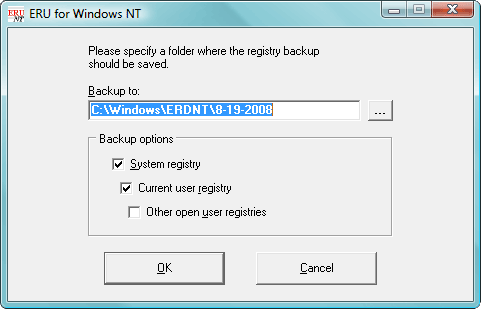
Windows Registry Editor Version 5.00

[HKEY_LOCAL_MACHINE\SOFTWARE\Microsoft\Windows\CurrentVersion\Component  Based  Servicing\PackageDetect\Microsoft-Windows-ServerFoundation-Base-LanguagePack-Package~31bf3856ad364e35~amd64~et-EE~0.0.0.0]
"Package_for_KB951072~31bf3856ad364e35~amd64~~6.0.2.0"=dword:00000002
"Package_for_KB955839~31bf3856ad364e35~amd64~~6.0.1.0"=dword:00000002
"Package_for_KB952154~31bf3856ad364e35~amd64~~6.0.2.0"=dword:00000002
"Package_for_KB970653~31bf3856ad364e35~amd64~~6.0.1.0"=dword:00000002
"Package_for_KB967723~31bf3856ad364e35~amd64~~6.0.1.7"=dword:00000002
"Package_for_KB976098~31bf3856ad364e35~amd64~~6.0.1.1"=dword:00000002
"Package_for_KB970430~31bf3856ad364e35~amd64~~6.0.1.6"=dword:00000002
"Package_for_KB979306~31bf3856ad364e35~amd64~~6.0.1.0"=dword:00000002
"Package_for_KB981793~31bf3856ad364e35~amd64~~6.0.1.1"=dword:00000002
"Package_for_KB2158563~31bf3856ad364e35~amd64~~6.0.1.0"=dword:00000002
"Package_for_KB2345886~31bf3856ad364e35~amd64~~6.0.1.1"=dword:00000002
"Package_for_KB2443685~31bf3856ad364e35~amd64~~6.0.1.0"=dword:00000002
"Package_for_KB2570791~31bf3856ad364e35~amd64~~6.0.1.1"=dword:00000002
"Package_for_KB970158~31bf3856ad364e35~amd64~~6.0.1.9"=dword:00000002
"Package_for_KB2564958~31bf3856ad364e35~amd64~~6.0.1.2"=dword:00000002
"Package_for_KB2633952~31bf3856ad364e35~amd64~~6.0.1.0"=dword:00000002
"Package_for_KB2677070~31bf3856ad364e35~amd64~~6.0.1.1"=dword:00000002
Tom. While, I've got to thank you for your tolerance, patience and understanding, there is no way that I would have the confidence to tackle the fix you've just come up with, without another machine to fall back on. So, we have now decided to go for a new laptop, and as soon as it is up and running, I will have a go at following your instructions on this machine. Meanwhile, thank you once again for the time that you have put in trying to help me out.
Alternatively, we could make a full system image which would act as a fallback to revert to should things not go as planned! But, once again, it's your choice and I'll be happy regardless of the decision 