Windows Vista Forums

File's
  1. #1
    americancritic's Avatar

    Senior Member


    Join Date : Nov 2010
    Arizona
    Posts : 1,543
    Windows Vista Home Premium 64 bit Sp2
    Local Time: 02:57 AM
    usa us arizona

    File's

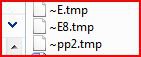
    Hello I have just found 3 wierd file's in my documents and don't know what they are and was wondering if someone could help.

    1. ~E.tmp
    2. ~E8.tmp
    3. ~pp2.tmp

    I have no idea what they are or how they got there but when I click on one it says (Windows cannot open this file) can someone tell me what they are and if they are safe to delete.

    Thank You

    americancritic


      My System SpecsSystem Spec

  2. #2
    richc46's Avatar

    BSOD Squad


    Join Date : Dec 2008
    Fairfield County, CT
    Posts : 19,259
    Windows 7 SP1 x64
    Local Time: 05:57 AM
    usa us connecticut


    Re: File's

    Looks like malware
    Run a full and updated virus scan
    Run a full and updated malwarebytes scan

      My System SpecsSystem Spec

  3. #3


    Account Suspended

    Join Date : Aug 2010
    Laytonsville, Maryland, USA
    Posts : 2,212
    Vista Business 32bit SP2 (build 6002)
    Local Time: 04:57 AM
    usa us maryland


    Re: File's

    Hi americancritic,

    Welcome back.

    These are all temp files - and as a general rule they are safe to delete (unless currently in use like if you're working on a Word document or if associated with malware - and then mostly to help identify the problem rather than that they shouldn't eventually be deleted). There is a special program designed for temp file problems - it removes ALL of them no matter where they are located. It is TFC by Old Timer TFC - Temp File Cleaner by OldTimer - Geeks to Go Forums and you should download and save it to your desktop. When run, it will close everything else, so be sure to save anything you're working on and basically close all your programs. If it asks (and when done even if it doesn't ask), reboot to complete the process.

    That should take care of the problem (though running the malware check recommended above by Richard FIRST is a good idea in case there are other problems that aren't just the existence of temp files and other measures are required instead of or before running TFC).

    I hope this helps.

    Good luck!

    Last edited by Lorien; 07 Jan 2011 at 07:47 AM. Reason: clarification
      My System SpecsSystem Spec

  4. #4
    derekimo's Avatar

    Senior Member


    Join Date : Jul 2009
    East Bay Area, CA
    Posts : 748
    Windows 7 Pro 64 SP1
    Local Time: 02:57 AM
    usa us california


    Re: File's

    Here's a little info on what those probably are,

    E.TMP - Trojan.Agent/Gen | SUPERAntiSpyware

    E8.TMP, Prevx

    I would definitely run a full antivirus and malwarebytes scan as already suggested.

      My System SpecsSystem Spec

  5. #5
    richc46's Avatar

    BSOD Squad


    Join Date : Dec 2008
    Fairfield County, CT
    Posts : 19,259
    Windows 7 SP1 x64
    Local Time: 05:57 AM
    usa us connecticut


    Re: File's

    I woiuld not just delete, I would make that anti virus scan to be safe. Those looke like something that should not be there, I agree with Derekirmo.
    Take the safe road and be sure. We have people who would be glad to help if the scans give bad news.

    Last edited by richc46; 07 Jan 2011 at 10:57 AM.
      My System SpecsSystem Spec

  6. #6
    Jacee's Avatar

    Security


    Join Date : May 2010
    Posts : 676
    Windows 7 Ultimate Vista Business SP2
    Local Time: 02:57 AM
    usa us washington


    Re: File's

    Hi americancritic, I was reading this topic and wondered when you deleted your old account and opened a new one ... did you change your passwords?
    Windows Mail

    By all accounts, your computer is infected.
    Warning! Backdoor Trojans

    These are the most dangerous, and most widespread, type of Trojan.
    Backdoor Trojans provide the author or ‘master’ of the Trojan with remote ‘administration’ of victim machines. Unlike legitimate remote administration utilities, they install, launch and run invisibly, without the consent or knowledge of the user. Once installed, backdoor Trojans can be instructed to send, receive, execute and delete files, harvest confidential data from the computer, log activity on the computer and more.
    If your computer was used for online banking or has credit card information on it, all passwords should be changed immediately to include those used for email, eBay and forums.
    You should consider them to be compromised.
    They should be changed by using a different computer and not the infected one, if not an attacker may get the new passwords and transaction information.
    Banking and credit card institutions should be notified of the possible security breech.
    More info can be found below:
    How Do I Handle Possible Identify Theft, Internet Fraud and CC Fraud?
    How to report ID theft, fraud, drive-by installs, hijacking and malware? Security | DSLReports.com, ISP Information
    When should I re-format? How should I reinstall?
    When should I re-format? How should I reinstall? Security | DSLReports.com, ISP Information
    If you choose to format and reinstall see this link for instructions:
    Windows: reformat and reinstall - Cyberwalker.com


    Download Combofix from any of the links below, and save it to your desktop.<--Important
    Link 1
    Link 2
    Link 3

    Click on this link Here to see a list of programs that should be disabled.
    The list is not all inclusive. If yours is not listed and you don't know how to disable it, please ask.
    If your anti-virus or firewall complains, please allow this script to run as it is not malicious.
    Next: Disconnect from the internet. If you are on Cable or DSL, unplug your computer from the modem.
    Next: Please disable all onboard security programs (all running with back ground protection) as it may hinder the scanner from working.

    This includes Antivirus, Firewall, and any Spyware scanners that run in the background.
    • Double click combofix.exe and follow the prompts.
    • When finished, it will produce a log for you. Post that log.
    Note: Do not mouseclick combofix's window while its running. That may cause it to stall
    Please be patient while the scan runs, at times it may appear to stall.
    When finished and after reboot (in case it asks to reboot), it should open a log, combofix.txt.
    Post this log in your next reply
    After rebooting ensure your Security applications have been re-enabled.

    In your next reply post:
    ComboFix.txt
    ***A guide and tutorial on "How to use Combofix" can be found here:
    A guide and tutorial on using ComboFix

      My System SpecsSystem Spec

  7. #7
    richc46's Avatar

    BSOD Squad


    Join Date : Dec 2008
    Fairfield County, CT
    Posts : 19,259
    Windows 7 SP1 x64
    Local Time: 05:57 AM
    usa us connecticut


    Re: File's

    TY Jacee for teaching us all the correct way to handle these insidious problems

      My System SpecsSystem Spec

  8. #8


    Account Suspended

    Join Date : Aug 2010
    Laytonsville, Maryland, USA
    Posts : 2,212
    Vista Business 32bit SP2 (build 6002)
    Local Time: 04:57 AM
    usa us maryland


    Re: File's

    Based on the situation, I sent Jacee a PM asking her to specifically examine this thread. It seems the situation is quite serious (moreso than I initially thought and I readily admit I underestimated it) - but it's now in very capable hands.

      My System SpecsSystem Spec

  9. #9
    richc46's Avatar

    BSOD Squad


    Join Date : Dec 2008
    Fairfield County, CT
    Posts : 19,259
    Windows 7 SP1 x64
    Local Time: 05:57 AM
    usa us connecticut


    Re: File's

    I would have done the same after the results were in.That is why I suggested the test.

      My System SpecsSystem Spec

  10. #10
    americancritic's Avatar

    Senior Member


    Join Date : Nov 2010
    Arizona
    Posts : 1,543
    Windows Vista Home Premium 64 bit Sp2
    Local Time: 02:57 AM
    usa us arizona

      Thread Starter

    Re: File's

    Hello lastnight I ran a complete scan using Malwarebytes and it came back clean and then I ran my AV again and it came back clean but these things are still there so I am reading all the help from you guys and I will do what you suggest.

      My System SpecsSystem Spec

Page 1 of 6 123 ... LastLast
File's problems?

Similar Threads
Thread Thread Starter Forum Replies Last Post
How can I preview split file without downloading entire file and combining parts? nkringo Browsers & Mail 0 23 Nov 2009
Read a line from a text file, without loading the entire file inmemory Personne PowerShell 7 13 Dec 2008
Scheduled task (run .bat file) fails every time with 0x80070002 (file not found) Ben Dilts Vista General 2 22 Jul 2008
file icons dont match contents-file names hidden Fosbury Vista file management 0 07 May 2008
coping file from a remote file share - FILE IS NO LONG THERE bogus error message Heith Vista networking & sharing 0 18 Oct 2007